Small Caps Generator – Convert Text to Copyable Small Caps
Convert normal text into small-cap-style Unicode characters with this free Small Caps Generator. Type your text, preview the result, and copy it to paste into bios, captions, usernames, and more.
What Is a Small Caps Generator?
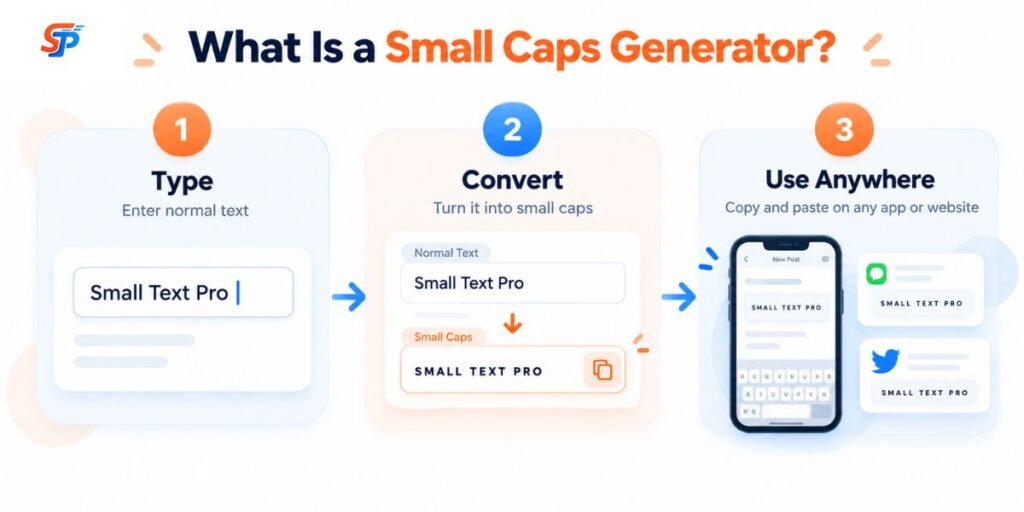
A Small Caps Generator converts ordinary text into Unicode characters that resemble small capital letters. You type normal text, the tool maps each letter to a matching small-cap-style Unicode character, and it returns a version of your text that looks like it uses small caps — even though no actual font has been applied.
This matters because the output isn’t a font in the traditional sense. It’s a string of specific Unicode characters that happen to look like small capital letters in most typefaces. Because these are just characters — the same kind of characters as any letter you type — you can copy them and paste them into a bio, a caption, a chat message, or a display name, and they’ll typically show up correctly as long as the app or device supports the underlying Unicode characters.
In this tool, “small caps” refers to that visual effect: lowercase letters get replaced with smaller capital-shaped characters, while your original capital letters generally stay as regular full-size capitals. That contrast is what creates the small-caps look.
How to Use the Small Caps Generator?
- Enter or paste your text into the input box.
- The generator converts it automatically as you type.
- Review the result to make sure every character displays the way you expect.
- Copy the generated text.
- Copy it. Paste it in the bio, caption, message, or document you want to use it in.
Small Caps Examples
The table below shows how a few common phrases look after conversion, based on the standard small-cap Unicode mapping this tool uses. Rendering can vary slightly by device and font, so paste a short test phrase into the app you plan to use before committing.
| Normal Text | Small Caps Result | Example Use |
|---|---|---|
| Creative Designer | Cʀᴇᴀᴛɪᴠᴇ Dᴇꜱɪɢɴᴇʀ | Portfolio bio or headline |
| Gaming | Gᴀᴍɪɴɢ | Gaming profile tag |
| Follow Me | Fᴏʟʟᴏᴡ Mᴇ | Social media caption |
| Welcome Back | Wᴇʟᴄᴏᴍᴇ Bᴀᴄᴋ | Channel banner or intro text |
| Your Name | Yᴏᴜʀ Nᴀᴍᴇ | Display name styling |
Treat these as representative examples rather than a guarantee for every possible word — always check the live output from the generator above, since it reflects the tool’s actual current character mapping.
How Does Small Caps Text Work?
Unicode Small Caps vs. True Typographic Small Caps
| Feature | Unicode Small-Cap-Style Text | Typographic Small Caps |
|---|---|---|
| How it’s produced | Character substitution using existing Unicode code points | A font feature or dedicated glyph set applied to normal text |
| Depends on a font | No — the characters are consistent regardless of font, though appearance varies slightly by typeface | Yes — requires a typeface that includes true small-cap glyphs or supports the OpenType smcp feature |
| Copy/paste behavior | Fully copyable and pasteable as plain text | Not copyable as “small caps” — copying it just copies the regular letters, since the small-cap look is a display feature, not the character itself |
| Character consistency | Some letters use close approximations; not a perfect one-to-one set | Every letter is purpose-designed by the typeface, so coverage is complete and consistent |
Where Can You Use Small Caps Text?
Social Media Bios
Display Names and Usernames
Discord and Gaming Profiles
Captions and Short Labels
YouTube Channel or Profile Text
Messaging Apps
When Small Caps Work Well — and When They Don't
Small caps generally work well for:
- A short display name or profile tag.
- A two- or three-word label or tagline.
- A gaming nickname.
- A brief decorative heading.
- A short caption accent that draws the eye to one phrase.
- An entire paragraph or article — the substitute characters are harder to read at length than standard letters.
- Long-form writing of any kind.
- Text where accessibility and maximum readability are the priority.
Small Caps vs. ALL CAPS
Frequently Asked Questions
How do I make small caps text?
Type or paste your text into the generator, let it convert automatically, then copy the result and paste it wherever you want to use it.
Is small caps text a font?
No. It's a set of specific Unicode characters that visually resemble small capital letters — no font is installed or applied.
Is small caps text Unicode?
Yes. The generator substitutes your letters with existing Unicode characters designed to look like small capitals.
What is a Small Caps Generator?
A Small Caps Generator is a tool that converts ordinary text into Unicode characters that resemble small capital letters, so you can copy and paste the result anywhere text is accepted.
Can I use small caps on Instagram?
Small-cap-style text usually works in Instagram bios and captions since they accept a wide range of Unicode characters. Field-specific restrictions can change, so it's worth previewing before publishing.
Is this Small Caps Generator free?
Yes, this tool is completely free — no sign-up, no login, and no hidden charges are ever required to use it.