
Fancy Text Generator – Stylish Fonts to Copy and Paste
With our Fancy Text Generator, you can preview multiple fancy text styles as you type and copy the version you prefer.
What Is a Fancy Text Generator?
A fancy text generator is a tool that replaces your ordinary letters with visually distinct Unicode characters resembling bold, italic, cursive, gothic, circled, or other decorative styles. Type “Fancy Text” and you might get results like
For example, type:
Fancy Text
and you may get styles such as:
𝐅𝐚𝐧𝐜𝐲 𝐓𝐞𝐱𝐭
𝑭𝒂𝒏𝒄𝒚 𝑻𝒆𝒙𝒕
𝔽𝕒𝕟𝕔𝕪 𝕋𝕖𝕩𝕥
𝙵𝚊𝚗𝚌𝚢 𝚃𝚎𝚡𝚝
Ⓕⓐⓝⓒⓨ Ⓣⓔⓧⓣ
Each of those lines looks like a different font applied to the same words. In reality, every letter has been replaced with a separate, individually encoded character that happens to look styled. Nothing is installed, and no formatting is “applied” the way it would be in a word processor—the styling lives inside the text itself.
That’s also what makes this text copyable in the first place. When you copy a bold word from a design tool, you’re usually copying formatting instructions tied to that specific app. When you copy 𝐅𝐚𝐧𝐜𝐲 𝐓𝐞𝐱𝐭 from a Unicode generator, you’re copying the characters themselves, so they travel with the text into a text message, a caption, or a bio field.
How Does a Fancy Text Generator Work?
Most generators work through a lookup table. Each ordinary letter is mapped to a corresponding “styled” Unicode character, and the tool substitutes one for the other as you type:
ABC → 𝐀𝐁𝐂 ABC → 𝔸𝔹ℂ
A large share of the bold, italic, script, Fraktur, double-struck, sans-serif, and monospace letters used for fancy text come from Unicode’s Mathematical Alphanumeric Symbols block. Unicode originally defined that block for mathematical and technical notation, where different letter styles — like italic versus double-struck — carry distinct meanings in formulas.
Their popularity as decorative social media text is a repurposing of those symbols, not their original intent. That’s also why coverage is uneven and why a handful of characters have no clean-styled equivalent.
Combining Characters
Not every effect comes from a one-to-one letter swap. Some styles use combining marks—characters designed to attach to the letter before them—to produce effects like
- underline-style text
- strikethrough text
- accented letters
- stacked marks
- glitch or Zalgo-style text
A single combining mark often renders reliably, though results can still vary across apps and devices. Stacking many of them on the same letter, as in heavy Zalgo text, makes the result harder to read and more likely to render inconsistently across apps.
How to Use Our Fancy Text Generator
Using the tool is intentionally simple:
Type or paste your text into the input box.
Browse the generated styles as they appear.
Compare a few options for readability, not just novelty.
Tap or click Copy on the style you want.
Paste it into your bio, caption, display name, or message field.
Before you commit to a style for something public — a profile name, a store listing, a title — paste it into the actual app first. The same characters can render slightly differently depending on the device and font support, so a quick preview in the real destination saves you from an unpleasant surprise later. If you want compact Unicode characters instead of decorative styles, try our small text generator.
Fancy Text Copy and Paste
A copy-and-paste fancy text generator is the whole idea behind Unicode-based styling. It works differently from copying “rich text” out of a document—when you copy fancy text, you’re copying literal Unicode characters, not a font file or a formatting tag. That means fancy fonts copy and paste with nothing to install, and nothing breaks when formatting gets stripped elsewhere.
Unicode styling often survives a normal copy-and-paste, but it isn’t guaranteed to look identical everywhere. Some apps filter out certain characters or display them differently than expected, and a few fields restrict which characters are allowed at all. The receiving device may also lack a font capable of rendering a specific character. Copy freely, then check how the result actually looks in the field you’re pasting into.
Fancy Text vs a Real Font
| Fancy Unicode Text | Traditional Font |
|---|---|
| Usually swaps the underlying characters | Changes how the same characters look |
| Can typically be copied and pasted with its appearance intact | Styling often doesn't survive a copy-paste into plain text. |
| Doesn't normally require installing anything | Custom fonts may need installation or web-font support. |
| Built from Unicode symbols or character substitutions | Built from a typeface file, such as Arial or Times New Roman |
| Appearance and support can vary by device. | Appearance depends on which font is actually applied |
“Fancy font generator” and “fancy text generator” are used interchangeably, but they technically describe different things.A simple way to see the difference: switching “Hello” from Arial to Times New Roman doesn’t touch the underlying letters—a screen reader, a search engine, and a database still see the word “Hello.” Changing “Hello” to 𝐇𝐞𝐥𝐥𝐨, on the other hand, replaces the ordinary Latin letters with entirely different Unicode characters. It looks similar to a person, but it’s a different data string.
Popular Fancy Text Styles
Coverage varies by generator, but these are the styles people reach for most often, along with when each makes sense.
Bold Fancy Text
𝐅𝐚𝐧𝐜𝐲 — good for a single emphasised word or a short headline-style phrase, like flagging “NEW COLLECTION” at the top of a caption while the rest of the post stays in normal text.
𝐹𝑎𝑛𝑐𝑦—reads close to standard italics and works well for a subtitle, a quote, or a softer accent than bold.
Cursive and Script Text
ℱ𝒶𝓃𝒸𝓎 — cursive fancy text that feels decorative and personal, often used for a name or a short signature-style phrase. Longer strings in script get harder to read quickly, so it suits a name more than a paragraph.
Gothic and Fraktur Text
𝔉𝔞𝔫𝔠𝔶 — heavy, old-world styling that stands out visually but is one of the harder styles to read at speed. Best kept short.
Double-Struck and Monospace Text
𝔽𝕒𝕟𝕔𝕪 and 𝙵𝚊𝚗𝚌𝚢 — double-struck has an outlined, “textbook” look; monospace gives every character an equal width, which some people like for a clean, code-like aesthetic in usernames.
Bubble and Circled Text
Ⓕⓐⓝⓒⓨ — playful and rounded, popular for display names, though not every letter and number has a circled equivalent, so unsupported characters may fall back to plain text.
Small Caps and Minimal Text
ᶠᵃⁿᶜʸ-style small or superscript letters give a subtler, quieter look than the bolder styles above — useful when you want a slight visual difference without shouting.
Aesthetic and Decorative Text
Aesthetic text often uses wider spacing, symbol borders, or mixed character sets that lean toward a specific visual mood rather than mimicking a classic font style. It works well for short taglines or profile flourishes.
Glitch and Zalgo Text
Built from stacked combining marks layered on ordinary letters. Effective in very small doses for a chaotic or “corrupted” look; unreadable and prone to rendering issues in anything longer than a few words.
Not every style has a matching character for every letter, number, or punctuation mark. When a generator encounters a gap, it will typically leave that character unchanged or substitute a visually similar one — that’s a limitation of the style, not a bug in the tool.
Our generator also includes styles beyond the ones above, including full-width text, upside-down text, superscript text, subscript text, and strikethrough text — useful when you want something more specific than a classic bold or script look.
Where Can You Use Fancy Text?
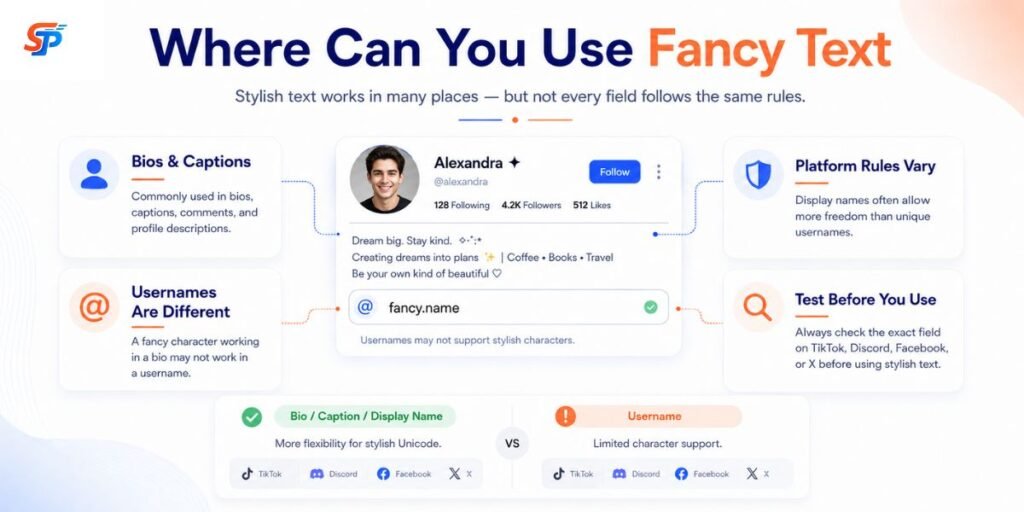
Decorative Unicode tends to work best in short bursts, not across long stretches of writing. Where it’s accepted also depends on the specific field you’re typing into — the same platform can treat two fields very differently.
Bios, Captions, and Display Names
These fields are usually designed to accept broad Unicode input, which is why fancy text appears here most often.
A creator might style one line of a bio, like:
✦ Travel • Coffee • Photography ✦
while keeping the link, contact email, or business hours underneath in plain text. That keeps the eye-catching part eye-catching, and the useful part easy to read and tap.
Usernames, Handles, and Gamer Tags
This is where restrictions usually kick in, even on a platform that welcomes fancy text in a bio.
Discord’s own account settings only allow lowercase letters, numbers, underscores, and periods in a username — no decorative Unicode. Its display name field, by contrast, accepts almost any Unicode, including emoji.
Instagram follows a similar split. The @handle is limited to letters, numbers, periods, and underscores. The bolded name field above the bio accepts a much wider range of characters.
Other platforms and games draw the line in different places, and the rules can change. A symbol that works in one game’s display name may be rejected in another’s, or even in that same game’s username field. If a name matters to you — a store name, a gamer tag you’ll keep for years — test the exact characters in the exact field before you commit to them.
Fancy Symbols and Decorative Characters
Symbols add a finishing touch without needing a full styled font: a star, a heart, a small arrow, a divider between a few words.
✦ Fancy Text ✦ 🖤 Coffee • Travel • Photography
Used sparingly, symbols frame a short phrase. Used heavily — several symbols around every word — they slow the text down and, on some platforms, push you toward a character limit. Treat them as punctuation for a look, not decoration for its own sake.
Does Fancy Text Work Everywhere?
No. Whether a piece of styled text displays the way you expect depends on several things at once: the specific characters, the operating system, the browser or app, the fonts installed on the receiving device, and whatever rules that particular field enforces.
Two things follow from that. First, the same text can look perfect on your phone and slightly off — or broken — on someone else’s phone, purely due to font differences. Second, one field on a platform, like a bio, might accept fancy text while a field right next to it, like a username, doesn’t.
If a piece of text matters, test it in the exact field where you plan to use it, not in a similar one.
Why Do Some Fancy Characters Show as Boxes?
A blank box, question mark, or empty space is a font problem, not a broken character.
A glyph is the shape a font draws for a given character. Not every font on every device has a glyph for every Unicode character — especially less common ones, like many from the Mathematical Alphanumeric Symbols block.
Whether a character renders correctly depends on a few things together:
- which character it is
- what fonts are installed on that device
- the operating system
- the browser or app
- how current the software is
That combination is the whole explanation for why the same fancy text can look fine on one phone and show boxes on an older device. If a piece of styled text matters — a store name, a public username — check it on more than one device first.
Fancy Text and Readability
Short bursts tolerate decoration well: a name, a heading, one accented phrase. A full paragraph in the same style is a different story. Readability drops, sometimes sharply, especially with busier styles like gothic, script, or anything built from combining marks.
A reasonable rule of thumb: use fancy text for the part meant to catch attention. Keep the part meant to communicate something — instructions, explanations, real information — in plain text.
Fancy Text and Accessibility
This deserves real attention, not a footnote.
Decorative Unicode characters aren’t a style layered over normal text, the way bold or italic is in a word processor. They’re different characters underneath. Assistive technology, including screen readers, reads from those underlying characters.
In practice, that can mean a screen reader announces the technical name of each character instead of the plain letter — for example, reading a bold-styled word letter by letter as “mathematical bold capital A, mathematical bold capital B…” rather than the word itself. How this plays out depends on the specific characters, the screen reader, the app, and the user’s settings. It isn’t identical everywhere or for everyone.
A practical approach: Keep essential information — instructions, phone numbers, emails, links, prices, calls to action — in plain text.
Use decorative Unicode as an accent, not the primary way you communicate something important.
Preview important content rather than assuming it will be read as you intend.
Avoid stretching heavily styled text across long passages.
A short, styled name or tagline is a reasonable choice. A paragraph of instructions in unusual Unicode characters is much harder to justify.
Privacy and Safe Use
Generating fancy text is a simple transformation. How a specific website handles what you type is a separate question, and not one we can answer here without knowing that site’s setup.
The safe default for any unfamiliar web tool applies here too: don’t paste passwords, one-time codes, banking details, or confidential information into it. For a bio phrase or a birthday message, there’s little at stake. For anything sensitive, treat an unfamiliar text tool the way you’d treat any other unfamiliar web form.
How to Choose a Fancy Text Style
Weigh these against each other rather than picking on looks alone:
- Readability — can someone read it at a glance?
- Length — short phrases forgive busier styles; long ones don’t.
- Purpose — a username has different needs than a bio accent.
- Platform support — some fields accept almost anything; others are strict.
- Device compatibility — will it hold up on an older phone or a different browser?
- Recognizability — if people need to find or type it, plainer is usually better.
- Accessibility — does it get in the way of assistive technology?
None of these rule out a style on their own. They’re trade-offs to balance against the text’s actual purpose.
Common Fancy Text Mistakes
- Decorating every word. A whole sentence in script or gothic is slow to read. Fix: style one word or phrase and leave the rest plain.
- Choosing novelty over readability. Zalgo and heavy Fraktur look striking for a second and get tiring fast. Fix: save the busiest styles for a single short word, not a full name or sentence.
- Assuming a username accepts what a bio accepts. Fix: test the actual field you’re setting the name in — don’t guess from a different one.
- Skipping the mobile preview. A style that looks fine on desktop can render differently on a phone. Fix: paste it into the real app on a phone before committing.
- Confusing Unicode text with an installed font. It isn’t a typeface being applied — it’s a different set of characters. Fix: remember that copying the text copies the character choice, not a font file.
- Putting essential information in decorative text. A phone number in gothic script is harder to read and harder for some software to process.
- Overloading a name with symbols. Five symbols on each side bury the name itself. Fix: use one or two, placed once.
When Plain Text Is Better
Some information is worth keeping ordinary, even if everything else on the page is styled:
- email addresses
- URLs and links
- phone numbers
- passwords and authentication codes
- step-by-step instructions
- legal or safety information
- important calls to action
Decorative text can reduce readability for these and, in some cases, make them harder for other software — such as search, spam filters, and screen readers — to process correctly
Conclusion
A fancy text generator is a tool that converts ordinary typed text into decorative Unicode characters that resemble bold, italic, gothic, circled, or other styled fonts. Rather than applying a real typeface, it replaces each letter with a different Unicode character that resembles the intended style. Because the result is still plain text, it can be copied and pasted into bios, usernames, captions, and messages on most apps that accept Unicode input.
Frequently Asked Questions
What is a fancy text generator?
A tool that turns ordinary typed text into decorative Unicode characters — resembling bold, italic, gothic, circled, and other styles — that you can copy and paste into supported apps and fields.
How does a fancy text generator work?
It matches each letter you type to a similar-looking Unicode character and swaps one for the other, drawing mostly from Unicode blocks originally built for mathematical notation.
How do I copy and paste fancy text?
Type your text into the generator, pick a style, copy it, then paste it into the field you're using — a bio, caption, message, or display name.
Why does fancy text look different on some devices?
Rendering depends on which fonts are installed, the operating system, the browser, and how current the software is — so the same characters can display differently from one device to the next.
Why do some fancy letters show up as boxes?
The device, app, or font in use doesn't have a glyph — a drawable shape — for that specific character, so it shows a placeholder instead.
Is fancy text accessible?
Not always. Screen readers read the underlying character, which can mean announcing a technical character name instead of the plain letter.
Can fancy text be used in usernames?
Sometimes, but don't assume it. Many platforms restrict the actual username or handle field more tightly than display names, bios, or posts. Test the specific field first.