Small Text Generator – Tiny Text to Copy and Paste
Convert normal text into small caps, superscript, subscript and tiny Unicode styles. Enter your text below, choose a result and copy it for Instagram, Discord, TikTok and other supported apps.
Free to use, no signup, instant results. mobile friendly.
Important: Small Text Generator creates Unicode characters, not downloadable font files. Appearance and acceptance can vary by app, field, device and font. Preview your text on the destination platform before publishing.
Compatibility note: Small Text Generator creates Unicode characters rather than downloadable font files. Appearance and acceptance can vary by app, text field, device and font. Preview your text on the destination platform before publishing it.
What Is a Small Text Generator?
A small text generator is a browser-based tool that swaps normal letters for smaller-looking Unicode characters. It doesn’t shrink a font; it replaces each letter with a different character that already looks tiny.
Normal text: Small Text Converted: ˢᵐᵃˡˡ ᵗᵉˣᵗ
That distinction matters more than it sounds like it should. Shrinking font size in a word processor changes how a letter is displayed, but the letter underneath stays the same “A” it always was.
A small text generator does something different: it replaces the letter “A” with a separate Unicode character that happens to be a small-capital “A.” As far as any app you paste it into is concerned, it’s just text, which is exactly why it survives copy and paste across platforms that would otherwise strip out custom fonts or images.
How to Use the Small Text Generator?
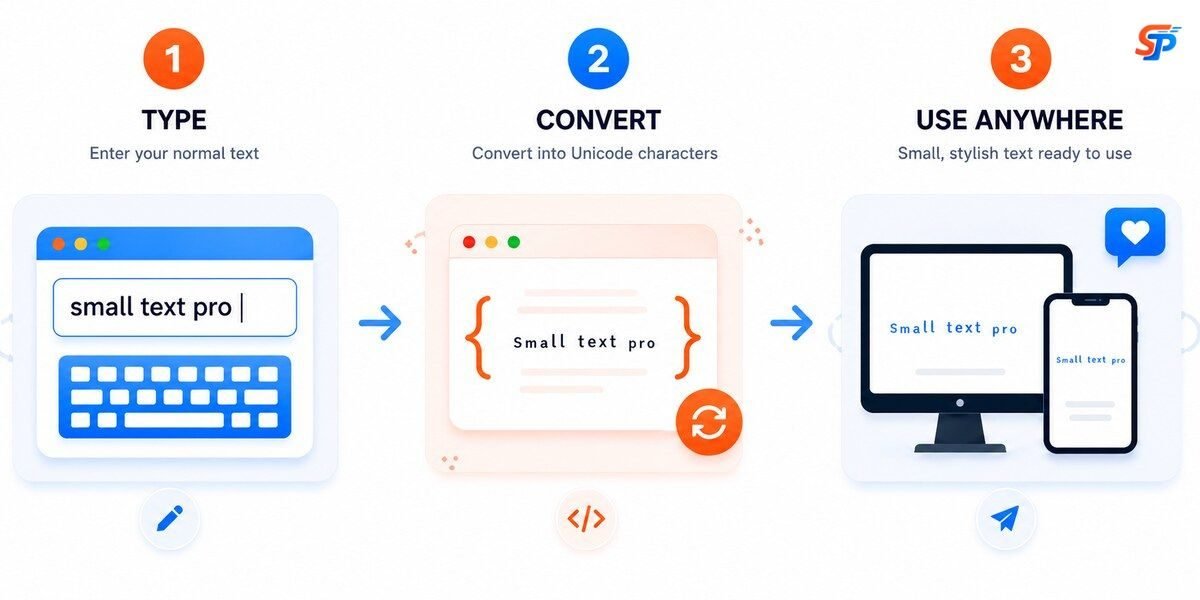
- Enter your text: Type or paste your normal text in the input box.
- Choose a style: Select your required font style.
- Copy and paste: Press the copy button and past the font at your required app.
Why People Use Our Small Text Generator?
A few recurring use cases show up again and again.
Unique Usernames
Gamers and forum users often want a name that stands apart from a long list of plain-text handles. A superscript or small-caps username does that without breaking the character limits most platforms enforce.
Better-Looking Bios
On Instagram and TikTok, a bio written entirely in small caps can read as more deliberate than the default text — it signals that someone put a bit of thought into their profile rather than leaving it untouched.
Styled Captions
Creators sometimes use small mixed text for a caption line to make a post feel more personal, saving the bold, attention-grabbing font for the first line and small text for a quieter follow-up thought.
Gaming Profiles
Small text works well for tags and clan names, especially on leaderboards where dozens of names run together — a differently styled name catches the eye faster.
Social Branding
Some creators keep a consistent small-text style across all platforms as part of their visual identity, so their name looks the same whether someone finds them on Instagram, TikTok, or Discord.
One practical note worth mentioning: shorter runs of small text tend to stay readable, while long paragraphs converted entirely into superscript or subscript can get genuinely hard to read, especially on smaller phone screens. Most experienced users style a username, a title, or a single line rather than an entire caption.
Types of Small Text Styles
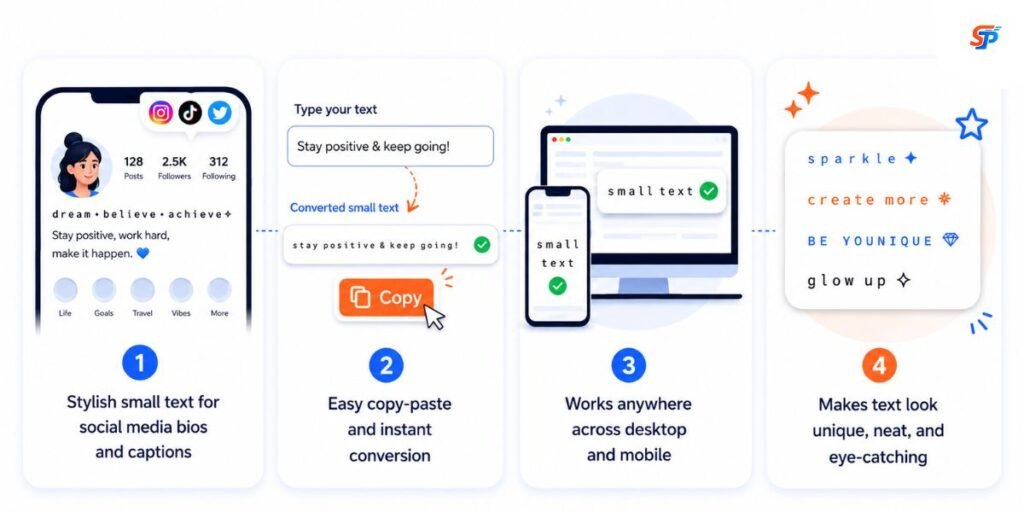
Each style behaves a little differently, and choosing the right one usually comes down to where you’ll use it.
Small Caps Generator
Small caps produce letters shaped like capitals but sized closer to lowercase. They’re the most legible among the small text styles, making them a solid default for names, titles, and bios where readability matters more than novelty.
Superscript Text
Superscript characters sit above the normal line, similar to a footnote marker. They work well for short notes, numbers, or a single stylized word — less so for full sentences, since raised text gets harder to scan the longer it runs.
Subscript Text
Subscript characters sit slightly below the line. Not every letter has a clean subscript equivalent in Unicode, so some words look a bit uneven. It’s a distinctive look for short labels and usernames but worth previewing before committing to a whole sentence.
Tiny Text
This is the smallest, most compact style in the set — popular for minimalist bios and aesthetic captions where the whole point is for the text to look understated.
Small Mixed Text
This style leans on small symbol-like characters rather than standard letterforms. It can make a name stand out, but it’s also the style most likely to run into display issues—a few of these symbols don’t render consistently on older phones or budget Android devices, so it’s worth checking how it looks before you post.
Symbol Small Text
This style leans on small symbol-like characters rather than standard letterforms. It can make a name stand out, but it’s also the style most likely to run into display issues — a few of these symbols don’t render consistently on older phones or budget Android devices, so it’s worth checking how it looks before you post.
The Role of Unicode in Small Text
Before Unicode existed, computer systems used different character encodings depending on the manufacturer and region. A document written on one machine could turn into broken symbols on another, because there was no shared agreement on what each numeric code should represent. Anyone who worked with text across different systems in the 1980s knows how much that used to break.
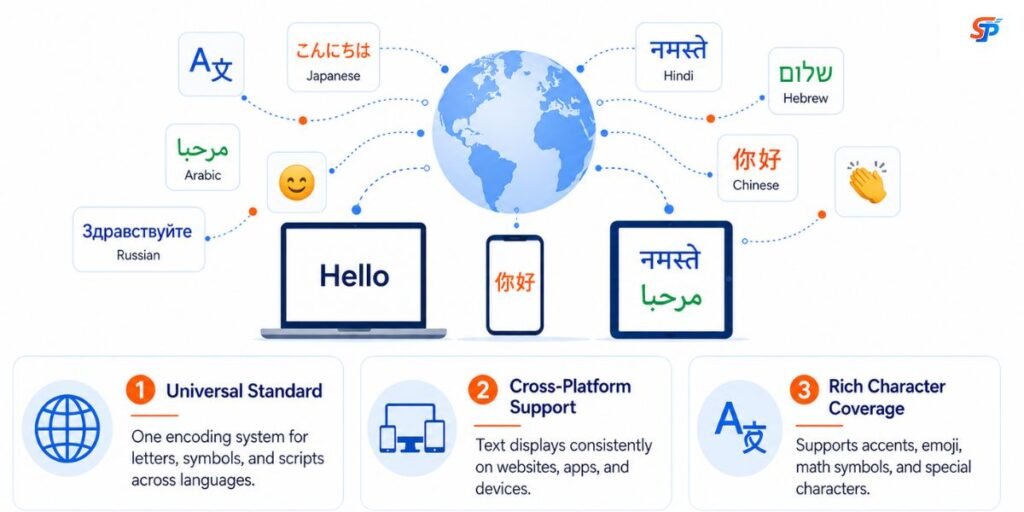
each character—letters, numbers, punctuation, and symbols—a unique code point. A code point is just an identifying number. The letter “A” has one, an Arabic character has one, and an emoji has one. Instead of each manufacturer inventing its own rules, every device that follows the Unicode standard reads the same code point the same way.
Unicode has grown well beyond basic alphabets since then, now covering thousands of characters across world languages, historical scripts, mathematical notation, and symbol sets. That range is exactly why small text tools work at all: the small-caps, superscript, and subscript characters used here already exist in the Unicode standard, originally added for uses such as phonetic transcription and scientific notation. A small text generator doesn’t invent new characters—it finds the ones that already look small and swaps them in for the letters you typed.The Unicode Consortium was formed to solve exactly that problem. The Unicode Standard, established in 1991, established a single global system that assigns.
This is also why copy-paste holds up across platforms. Your device doesn’t store a “picture” of a letter; it stores its Unicode code point. When you paste text elsewhere, the receiving app looks up that same code point and displays the matching character. As long as both systems support Unicode — which nearly all modern apps and browsers do — the small text shows up exactly as generated.
It’s worth being upfront about the limits here, too. Occasionally, a platform’s font doesn’t include a glyph for a specific Unicode character, and in those cases, a symbol can appear as a small box or a slightly incorrect shape — this is a gap in that app’s font support, not a flaw in the generator. It’s uncommon on major platforms like Instagram, Discord, or TikTok, but more likely on older devices or apps with limited font coverage. Some platforms also filter certain Unicode ranges for spam prevention, which occasionally strips unusual symbol styles out of usernames. None of this is unique to SmallTextPro—it’s a property of how Unicode rendering works everywhere.
What Is the Difference Between Small Text and a Smaller Font?
| Feature | Small Unicode text | Traditional font |
|---|---|---|
| Can be copied as styled text | Often yes | Usually no |
| Requires installation | No | Sometimes |
| Works in social-media fields | Depends on Unicode support | Usually unavailable |
| Provides complete alphabet | Not always | Usually yes |
| Offers exact design control | No | Yes |
| Appearance is consistent | Can vary by platform | Depends on the installed font |
The trade-off is real in both directions. Traditional fonts give you far more design control—exact weights, custom kerning, and brand-specific letterforms—but only where that font is installed. Unicode small text sacrifices some of that design flexibility in exchange for something traditional fonts can’t do: it travels as plain text into places where custom fonts simply aren’t supported, like a bio field or a chat message.
How Small Text Is Used on Different Platforms
Each platform has its own quirks worth knowing before you paste small text in.
Small text shows up most often in the single tagline under a display name, in captions, and in comments. Bios are the most common spot, since Instagram gives limited space and a small-caps line can make a tagline read as more deliberate than default text. If you want a wider range of Instagram-specific looks beyond small text, our Instagram Fonts Generator offers more decorative styles tailored to Instagram’s character rendering.
TikTok usernames, captions, and bio text all accept Unicode small text, though TikTok’s own font occasionally renders certain symbol styles slightly differently than Instagram’s. Creators often use small caps for a cleaner-looking username and save more decorative styles for captions. The TikTok Fonts Generator is built around styles that tend to hold up well on TikTok.
Nicknames, server names, and channel names on Discord all accept small text, and it’s a common way to make a server feel less like a wall of identical default-style names. Server owners sometimes use lowercase for channel names to create a quieter visual hierarchy than bold or all-caps channels. The Discord Text Generator is worth checking if you want styles tuned for Discord’s character limits and font rendering.
Across all three platforms, the underlying mechanism is identical — none of them actually “know” about small text as a built-in feature. They’re just displaying whatever Unicode characters were pasted in, the same way they’d display any other text.
Common Mistakes When Using Small Text
It’s easy to grab the most decorative-looking style and use it everywhere, but that’s usually a mistake. A username in symbol-heavy small text might look striking in the generator preview and then turn nearly unreadable once it’s shrunk down in a comment thread or a leaderboard listing. A few things worth keeping in mind:
- Readability first. Small caps remain legible at almost any size, making them a safer default for anything meant to be read quickly, like a display name or a title.
- Match the style to the length. Superscript, subscript, and symbol styles work better on short words than on full sentences—the shorter the text, the less the odd shapes affect readability.
- Check platform compatibility. Test a style in the actual app you’re posting to before locking it in as a permanent username, since rendering can vary slightly between Instagram, TikTok, and Discord.
- Choose based on purpose, not just looks. A bio meant to be read at a glance benefits from a clean style; a one-off caption has more room for something decorative.
- Avoid over-decoration. Stacking multiple stylized elements—small text, symbols, and spacing tricks—all at once usually reduces readability rather than improving how the profile looks
Other Text Generators From SmallTextPro
Small text is just one style out of many built on the same underlying idea — swapping regular letters for other Unicode characters. If you’re looking for something beyond tiny text, these are worth a look:
- Fancy Text Generator — decorative, stylized fonts for usernames and captions.
- Unicode Font Generator — a broader library of Unicode-based text styles
- Tiny Text Generator — more tiny-style variations beyond what’s covered here.
- Cursive Text Generator — flowing, script-style characters.
- Italic Text Generator — slanted Unicode text for emphasis.
- Bold Text Generator — bold Unicode characters that work where formatting tags don’t.
- Invisible Text Generator — blank-looking Unicode characters.
- Glitch Text Generator — distorted, glitch-style stacked characters.
- Cursed Text Generator — chaotic, heavily stacked Unicode text.
- Upside Down Text Generator — flipped text for a quick visual trick.
- Bubble Text Generator — circled bubble-style letters.
- Gothic Text Generator — blackletter-style Unicode characters.
- Superscript Text Generator—The text generated by this tool is used athematical exponents, scientific formulas, footnotes, citations, and digital content.
Benefits of Using Small Text Generator
The core appeal is convenience: it’s free, conversion happens instantly as you type, there’s nothing to download, and it works the same on a phone as it does on a desktop. Because the output is plain Unicode text, you copy it once, and it works everywhere Unicode is supported—no reformatting needed between apps.
There’s also no learning curve involved. You don’t need to know anything about code points or character encoding to use it — that’s handled behind the scenes. You type, glance through the available styles, and pick whichever fits the tone you’re going for. Nothing is stored or uploaded in the process, so there’s no account to manage and no data collected just to generate a line of text.
Frequently Asked Questions
How can I copy small text and use it somewhere else?
Enter your words in the Small Text Generator and choose the style you like. Use the copy option beside the generated text, then paste it into a bio, comment, message, username, or post.
Can I use small text on WhatsApp, Discord, and other social platforms?
Small Unicode text works on most modern apps and social platforms, including WhatsApp, Discord, Instagram, Facebook, Telegram, and YouTube. You can usually paste it just like normal text.
Is small text a real font?
No. It isn't a font file — it's a set of existing Unicode characters that happen to look smaller than standard letters, which is why it works without installing anything.
Can I copy and paste small text?
Yes. Generate your style, click to copy, and paste it into any app or website that accepts standard text input.
Are small text generators free?
Most, including this one, are completely free with no sign-up or software installation required.
What is Unicode text?
Unicode is a global character-encoding standard maintained by the Unicode Consortium. It assigns a unique code point to every character, which is why text displays consistently across different devices and platforms.
What is the difference between small text and tiny text?
They overlap in practice. Small text generally refers to the full range of small Unicode styles — small caps, superscript, subscript, and mixed text. Tiny text usually refers to the single smallest, most compact style within that range.
Explore more tools
Check out other free Unicode generators.

Instagram font Generator
Transform your plain text into stylish font for your Instagram profile.

Cursed Text Generator
Instantly generate scary, corrupted text effects for unique social media profile bios.
Cursive Text Generator
Use this tool to transform your text into beautiful cursive script instantly.
Italic Text Generator
Convert plain text into bold, stylish italic fonts for all social media platforms easily.

Discord Text Generator
Generate cool, stylish text fonts for your Discord profile and messages.

Glitch Text Generator
Transform plain text into eye-catching distorted and spooky glitch fonts online.
Fancy Text Generator
Convert regular text into stylish and decorative fancy fonts instantly online.
Zalgo Text Generator
Create distorted, weird, and haunted Zalgo text effects for free online.