Cursed Text Generator: Copy and Paste Glitch Text
A cursed text generator turns ordinary writing into distorted Unicode text by attaching combining marks to each letter.
What Is a Cursed Text Generator?
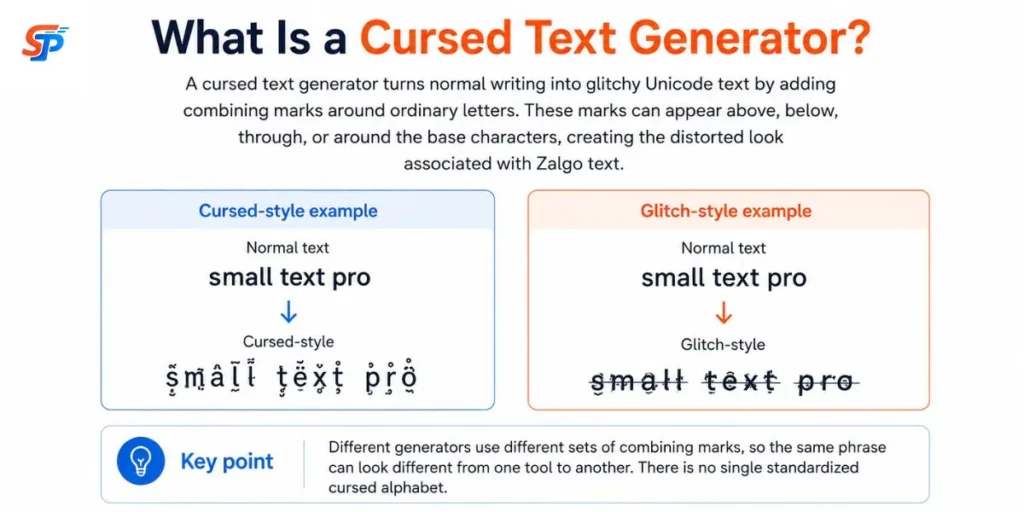
A cursed text generator turns normal writing into glitchy Unicode text by adding combining marks around ordinary letters. These marks can appear above, below, through, or around the base characters, producing the distorted look commonly associated with Zalgo text.
Here’s what that looks like in practice:
Normal text: Cursed Text
Cursed-style: C̥u̬r̖s̙e̯ḏ T̞e̦x̜t̟
Or a lighter, glitch-leaning version:
Normal text: Hello
Glitch-style: H̷e̸l̴l̶o̷
Different generators pull from different sets of combining marks, so the same input phrase can come out looking noticeably different depending on which tool made it. Neither version is more “correct”—there’s no single standardized cursed alphabet.
How Does Cursed Text Work?
Cursed text isn’t a special font. It’s a Unicode quirk. Every accent mark, like the one on “é,” is its own code point that attaches to the preceding letter. Unicode sets no hard limit on how many marks one letter can carry, so you can stack ten, twenty, even fifty onto a single character.
That’s technically valid, but no font was built to display it cleanly. The result looks jagged, distorted, almost alive. This is the trick behind “Zalgo text.” It spread through early creepypasta forums, then into Discord bios and horror usernames. Here’s an example. Type “Help.” Layer combining marks above, through, and below each letter.
It looks corrupted or glitching, but the actual letters haven’t changed. Only the marks have it. Our Cursed Text Generator lets you control that stacking. Adjust the intensity up or down. Copy clean, working Unicode text. Paste it anywhere Unicode is supported.
How to Make Cursed Text
you just follow these steps one by one
- Just type or paste your phrase into the generator.
- Choose how heavy the effect should be if the tool offers that control.
- Preview the result before committing to it.
- Copy the output.
- Paste it into the destination — a bio, a caption, a chat — and check that it still looks right there.
That last step matters more than it seems like it should. A phrase that looks great in the generator’s preview box can compress, clip, or partially fail once it lands inside a different app’s font and line-height rules. For different font styles, you can combine cursed effects with Fancy Text Generator or create simple emphasis using Bold Text Generator.
Create Your Own Cursed Text
Enter your words into the Cursed Text Generator.
Choose a style. Adjust the intensity. Decide whether the marks should rise, drip, cut through the middle, or spread in every direction.Then test the result where you plan to use it.
A restrained glitch may be enough for a gaming bio. A dripping style can carry a Halloween title. Heavy Zalgo text works best when the words are short and the goal is pure visual impact.
The best cursed text does not hide the message completely.
It lets the reader see just enough.
Why Are Symbols Above and Below the Letters?
Different combining marks are designed to render in different positions relative to a base character — commonly above it, below it, through it, or around it. A cursed text generator chooses marks based on the visual effect it’s going for, often pulling from several of these positions at once and stacking multiple marks onto a single letter.
The letter itself hasn’t changed size or shape — it’s carrying more attached characters than usual, and each one adds visual height above or below the line. The heavier the stacking, the more the line spacing gets disrupted, which is why dense Zalgo text can visually intrude into the line above or below it in some layouts.
Cursed Text for Names and Usernames
This is one of the most common reasons people reach for a cursed text generator, and it’s also where things most often go wrong. A few distinctions are worth keeping straight:
- Display name — the name shown next to your messages or profile. This field is often the most permissive.
- Username or @handle — your unique account identifier. This is typically the most restrictive field, and many platforms limit it to alphanumeric characters only.
- Bio, caption, or status — usually more permissive than a username, but still subject to length limits.
Cursed Unicode may display in some fields, while usernames, display names, or bios apply different rules from each other. There isn’t a reliable way to know for certain without trying it in the actual field you plan to use—platform behavior changes, and this article can’t verify current rules for you at the moment you’re reading it.
A practical pattern: apply a light cursed or glitch effect to a display name or bio, and leave the actual username in standard characters. That way the identifier that has to work reliably — the one people search for or that a chat mentions with an @ — stays functional even if the decorative part doesn’t render everywhere.
Cursed Text for Discord, Instagram, TikTok and Other Apps
The same field distinctions above apply across platforms: usernames, display names, bios, captions, comments, and messages can each follow different character rules on the same app. Don’t treat any of this as permanent—apps update their character filters, font rendering, and validation logic over time, so something that displays cleanly today isn’t guaranteed to look the same after a future update.
For a horror-themed post or a spooky display name, a light-to-medium effect on a short phrase tends to hold up better across apps than converting a long caption in full. The more marks stacked into the text, the more there is for any single platform’s renderer, filter, or normalization step to potentially mishandle. Previewing the pasted result directly inside the app you’re posting to — Discord, Instagram, TikTok, WhatsApp, or a gaming platform — remains the most reliable way to confirm it looks the way you intended.
Is Cursed Text a Real Font?
No. This is a common point of confusion, and it’s worth being precise about.
A font is a set of glyph shapes that a device draws when it encounters certain characters — if the font isn’t installed or doesn’t load, the intended look disappears, and a fallback font is typically shown instead. Cursed text isn’t that. It’s Unicode character data — a base letter plus combining marks — rendered by whatever font and text-rendering engine is available in the destination app or device. Not every font supports every combining mark equally, which is part of why the same cursed phrase can look slightly different, or show gaps, from one place to another.
That’s also why cursed text differs from a decorative image (a picture, not text at all) and from CSS-based visual distortion (styling applied by a webpage that usually doesn’t travel with copied plain text). Cursed text is the only one of the three that survives being copied into a plain-text field, because the distortion lives inside the character sequence rather than in a font file, an image, or a stylesheet.
Cursed Text vs Zalgo Text vs Glitch Text
These are practical labels used loosely and inconsistently across the sites where they’re popular — not formal Unicode classifications. Treat the table as a general guide. While cursed text creates distorted characters, Zalgo Text Generator tools add more extreme symbols and chaotic effects.
| Term | General Meaning | Typical Technique | Common Use |
|---|---|---|---|
| Cursed Text | Broad label for eerie or distorted Unicode text | Combining marks, in varying density | Horror content, creative posts, usernames |
| Zalgo Text | Specifically heavy, dense stacking | Many combining marks per character, above and below | Creepypasta, chaotic visual effects |
| Glitch Text | Digital-corruption aesthetic, often lighter | Combining marks, strikethroughs, or other distortions | Gaming, cyberpunk-themed content |
Why Does Cursed Text Look Different on Some Devices?
Rendering and character identity are two separate things. The Unicode sequence you copy can remain unchanged from one app to another, but it isn’t guaranteed to do so: some systems normalize, filter, sanitize, or otherwise transform combining marks during copy, paste, storage, or display.
Even when the character sequence stays identical, visual rendering can still differ because the font and rendering engine used to draw it can vary from one device or app to the next. One phone’s font might render a combining mark slightly higher than another’s; one app might compress vertical spacing to keep lines from overlapping, while another lets marks intrude into adjacent lines. Sometimes that’s a rendering difference; other times the underlying sequence itself was altered along the way.
Why Does Cursed Text Use So Many Characters?
Because each visible “letter” on screen can be built from several underlying characters: the base letter plus every combining mark attached to it. A five-letter word with a handful of marks per letter can easily contain several dozen actual Unicode code points, even though it visually looks like five letters.
Can Cursed Text Hit Character Limits?
Sometimes, yes — how much depends entirely on how a specific platform counts characters. Some systems count each underlying Unicode code point individually, which means a heavily cursed short word can consume far more of a character limit than its visual length suggests. Other systems may count differently, and normalization behavior on the platform’s side can also affect the final count. Because counting methods vary and aren’t something this article can verify universally, the safest approach for anything with a strict length limit—a username or a short bio field — is to keep the effect light and test the actual character count in that specific field before relying on it.
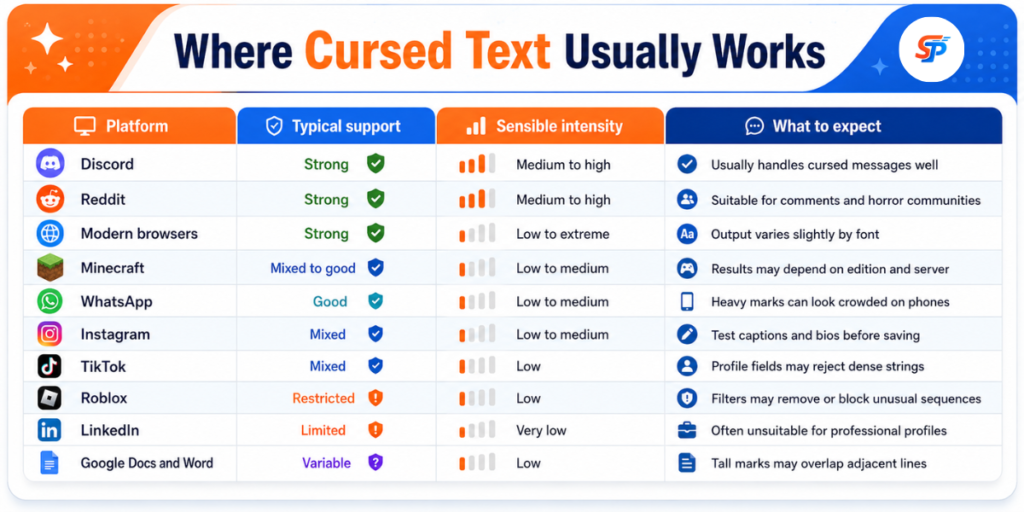
Where Cursed Text Usually Works
Unicode support is common, but every platform handles unusual characters differently. Do not treat this as a permanent promise. Apps update their filters and fonts. A style may work in a comment today but fail in a username tomorrow.
Is Cursed Text Accessible?
Not particularly, and it’s worth being direct about that rather than glossing over it.
Heavy combining-mark text can reduce readability for anyone and pose additional friction for people using assistive technology. Screen-reader behavior can vary depending on the software, browser, operating system, and the specific character sequence involved—it isn’t uniform across every tool. Copying, searching, and text-matching can also behave less predictably on heavily marked text, since normalization and indexing systems aren’t built around dense combining-mark sequences.
Where Cursed Text Works Best
- A short display name or status for Discord, gaming, or social profiles
- A single spooky line in a caption or post, rather than the whole caption
- A creepypasta or horror-story heading
- A gaming name meant to look corrupted or glitched
- A brief accent phrase inside otherwise normal writing
How to Remove Cursed or Zalgo Text
An UnZalgo cleaner generally removes selected combining marks while preserving the underlying letters, numbers, spaces, punctuation, and other intended characters where possible. The goal is to strip the marks responsible for the distorted look and recover something close to the original phrase.
One caveat worth knowing: some legitimate accents and diacritics also use combining marks, not just cursed-text effects. An aggressive cleaner can end up stripping those too, which means text in languages that rely on combining accents may come out slightly altered rather than perfectly restored. If you’ve received a cursed text you want to read normally or want to recover a clean version of something you generated, a cleaner tool is still the right starting point—just don’t assume the result will always be pixel-perfect for every language.
When Should You Avoid Cursed Text?
- Long paragraphs, where the readability cost compounds
- Instructions anyone needs to follow correctly
- Email addresses, URLs, and passwords, where an extra or misread character breaks functionality
- Contact information
- Legal text
- Navigation labels and other accessibility-critical content
Final Takeaway
Cursed text is Unicode text carrying extra combining marks — no font to install, no image involved, and nothing that inherently damages a device. Keep it short, preview it in the app you’re actually going to use, and save the heaviest settings for places where visual impact matters more than someone needing to read every word. A restrained effect on a few words usually lands better than maximum distortion applied to an entire sentence.
Frequently Asked Questions
What is a cursed text generator?
An online tool that converts normal writing into glitchy Unicode text by attaching combining marks to each letter, producing a distorted, Zalgo-style look without needing any font install or app.
Is cursed text copy-and-paste?
Yes. The distortion lives inside the Unicode character sequence itself, so it can be copied and pasted anywhere that accepts regular text — though rendering may vary from app to app.
What's the difference between Zalgo text and cursed text?
Zalgo text is the heaviest, most densely stacked version of the effect, with marks climbing well above and dripping below the line.
Can I use cursed text in a username?
Usually not reliably.Most platforms don’t allow non-alphanumeric characters in usernames, so it’s better to use the effect on a display name or bio and keep the username in plain text.
How do I remove or undo cursed text?
Paste it into an UnZalgo cleaner tool, which strips out the combining marks while trying to preserve the original letters, numbers, and punctuation.
Is cursed text a real font?
No. It's made entirely of standard text characters, not executable code or a hidden script, so it can't harm a device on its own.