Bold Text Generator – Copy and Paste Bold Text
Our bold text generator converts normal text into bold-looking Unicode characters that you can copy and paste into bios, captions, messages, and other supported fields. No font or app installation is required — you're copying text, not downloading anything.
How to Use the Bold Text Generator?
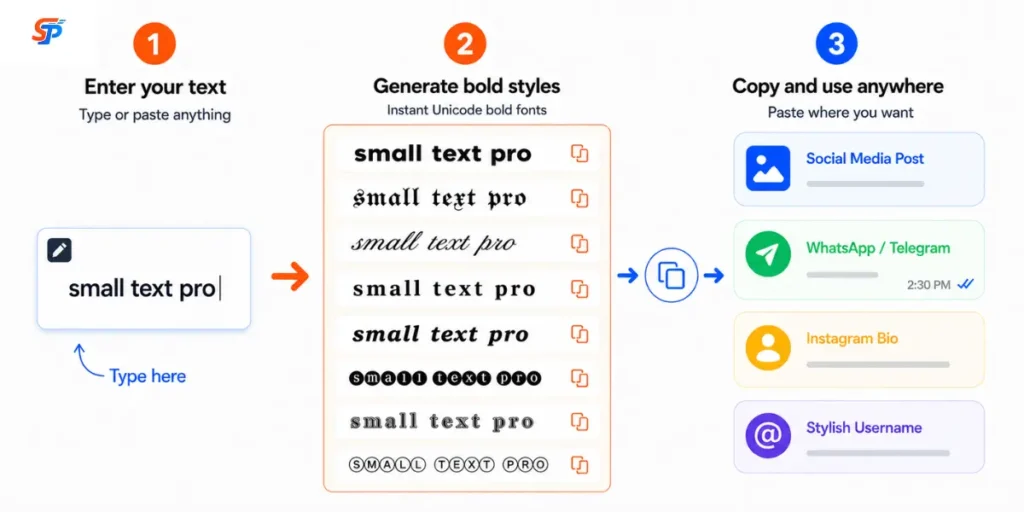
Enter your text, compare the styles, and copy the one that fits.
- Type or paste your text into the input field.
- Review the styles in the preview.
- Copy the bold text you want.
- Paste it into the field where you plan to use it.
Before you rely on it for something you can’t easily change later, paste the result into the actual field on the actual platform and check it there. A style that looks correct in the generator can still render differently elsewhere.
What Is a Bold Text Generator?
A bold text generator turns ordinary letters and numbers into separate Unicode characters that look bold. It doesn’t use CSS, HTML, or rich-text formatting—it swaps each character for a different one.
| Style | Example |
|---|---|
| Normal text | Make your words stand out |
| Bold serif | 𝐌𝐚𝐤𝐞 𝐲𝐨𝐮𝐫 𝐰𝐨𝐫𝐝𝐬 𝐬𝐭𝐚𝐧𝐝 𝐨𝐮𝐭 |
| Bold sans serif | 𝗠𝗮𝗸𝗲 𝘆𝗼𝘂𝗿 𝘄𝗼𝗿𝗱𝘀 𝘀𝘁𝗮𝗻𝗱 𝗼𝘂𝘁 |
How Unicode Bold Text Works?
Bold Text Styles You Can Copy and Paste
| Style | Example | Best Use |
|---|---|---|
| Bold serif | Bold serif | Bios, headlines, general emphasis |
| Bold sans serif | Bold sans serif | Clean, modern captions |
| Bold italic | Bold italic | Subtle emphasis within a sentence |
| Bold script | Bold script | Decorative names, invites |
| Bold Fraktur | Bold Fraktur | Gaming names, novelty branding |
| Double-struck | Double-struck | Distinctive outlined usernames |
| Circled | Ⓑⓞⓛⓓ | Compact tags or badges |
Where Can You Use Bold Text?
Support varies by platform, by field, and sometimes by app version, so treat platform notes as general guidance rather than a promise. It also matters which type of field you’re using: a login username is usually more restricted than a display name, and a display name is usually more restricted than a bio, caption, or post, since usernames often need to work with search, tagging, and account recovery.
Instagram, Facebook, and TikTok:
Many current versions of these platforms support Unicode characters in bios and captions, but acceptance and appearance may vary by field, device, font, app version, and platform policy. Bio fields tend to have shorter character limits than captions, and a short bold line is easier to scan than an entire bold paragraph.
LinkedIn and X (Twitter):
These platforms generally support styled Unicode text in posts, profiles, and headlines under the same conditions above. A fully bold LinkedIn headline can look cluttered next to plain-text headlines from other users, so a single bold word or phrase often stands out more than styling the whole line.
WhatsApp and Discord:
Both typically display styled text in messages and profile names, subject to the same device and app-version caveats. WhatsApp also has built-in bold formatting using asterisks, which applies real formatting rather than character substitution—that’s usually the better option when it’s available.
YouTube:
Titles, descriptions, and comments generally accept styled Unicode text. Whether YouTube’s search matches a styled phrase the same way it matches plain text can’t be confirmed, so keep important searchable words in standard characters somewhere in the description.
Gaming profiles and usernames:
Display names often accept Unicode characters, but many platforms restrict the core login username to standard letters and numbers when the display name field is more flexible. Check the specific field before committing to a style.
Unicode Bold vs HTML, CSS and Rich-Text Bold
| Method | What Changes | Survives Plain-Text Copying? | Best Use |
|---|---|---|---|
| Unicode bold | The character itself | Yes | Bios, usernames, plain-text fields |
HTML <strong> | Formatting plus strong importance | No | Meaningful emphasis on a web page |
HTML <b> | Visual formatting, no added importance | No | Presentational bold on a web page |
CSS font-weight | Rendered weight of the font | No | Styling text within a site’s design |
| Rich-text bold (Ctrl+B) | Formatting in the current editor | No | Documents, emails, formatting toolbars |
Does Unicode Bold Text Work Everywhere?
No. Support depends on the browser, operating system, device, and available fonts, so check key text before publishing.
Current versions of major browsers and apps usually display this character block correctly, since support has existed for years.
- Paste the text into the actual field on the actual platform.
- Check it on a second device or in a different browser, if you can.
- Replace any character that looks wrong with plain text.
Is Unicode Bold Text Accessible?
Not consistently. Screen-reader behaviour varies, so use styled Unicode sparingly, not for anything essential.
Some assistive technologies may announce the underlying mathematical character names, spell a word out letter by letter, or interpret certain characters differently than standard text. This isn’t true of every screen reader in every situation, but it happens often enough that decorative Unicode shouldn’t carry information a reader needs. Keep instructions, links, email addresses, phone numbers, and safety information in standard characters, and don’t rely on visual styling alone to communicate meaning.
Practical Bold Text Examples
Common Problems and Quick Fixes
| Problem | Likely Cause | Practical Fix |
|---|---|---|
| Characters show as empty boxes | The device or app’s font doesn’t include that character | Try a more common style, like bold serif or bold sans serif |
| Some letters didn’t change | That letter or symbol has no styled equivalent | Leave it as-is, or reword to avoid the character |
| Punctuation stayed normal | Most punctuation marks have no bold Unicode version | Expected behavior, not an error |
| Text looks different after pasting | The destination app reformatted or filtered the characters | Check the result directly in that app before publishing |
Tips for Better Results
A few quick habits worth building before you hit publish:
- Bold a short phrase rather than a full paragraph — it stays easier to scan.
- Compare serif and sans-serif versions before deciding; one usually fits your platform’s default font better.
- Preview your final text on both mobile and desktop.
- Test a new username or display name before applying it somewhere permanent.
- Keep links, contact details, and instructions in plain text.
- Check the platform’s character limit before finalising a bio or caption.
- Save your original plain-text version so you can revert quickly if needed.
Final Thoughts
Frequently Asked Questions
How does bold text copy and paste work?
The tool matches each letter or number to a corresponding styled Unicode character. Because the styling is built into the character itself, it copies and pastes like any other text.
Is Unicode bold text a real font?
No. It's a set of separate Unicode characters, not an installed font file, and it isn't the same as applying font-weight formatting to your original text.
Can I use bold text on social media?
Many current versions of platforms like Instagram, Facebook, LinkedIn, and X can display supported Unicode characters, but acceptance and appearance vary by field, device, and app version.
Can I generate bold numbers?
Yes. Digits 0 through 9 have styled versions in several available styles, including bold serif, bold sans serif, and double-struck.
Why do some characters remain unchanged?
Not every character has a styled equivalent. Most punctuation marks and many accented letters weren't assigned a version in the Unicode blocks this tool uses, so they stay in their normal form.
Why does bold text appear as boxes?
An empty box usually means the device or app's font doesn't include that specific character. Switching to a more common style, like bold serif, often resolves it.