Italic Text Generator Create Italic Text You Can Copy Paste
SmallTextPro Italic Text Generator is a tool to convert normal text to italic-style text without downloading a font or using design software.
What Does an Italic Text Generator Do?
An italic text generator converts ordinary letters into italic characters.
You may already know how italics work in Microsoft Word or Google Docs. Select the text and click the italic button. This works well inside the document, but the formatting may disappear when you copy the same words into a social media profile or another website.
An online italic text generator works differently. Instead of using standard font formatting, it mainly uses Unicode characters. Unicode is a way to make sure that letters, numbers, and symbols work on a wide range of computers and cell phones. It also includes characters that look bold, italic, or decorative. Because these are actual characters, you can copy and paste them into many supported apps..
For example:
Regular text: Create Something Great
Italic text: 𝐶𝑟𝑒𝑎𝑡𝑒 𝑆𝑜𝑚𝑒𝑡ℎ𝑖𝑛𝑔 𝐺𝑟𝑒𝑎𝑡
The meaning stays the same, but the appearance changes.
How to Create Italic Text
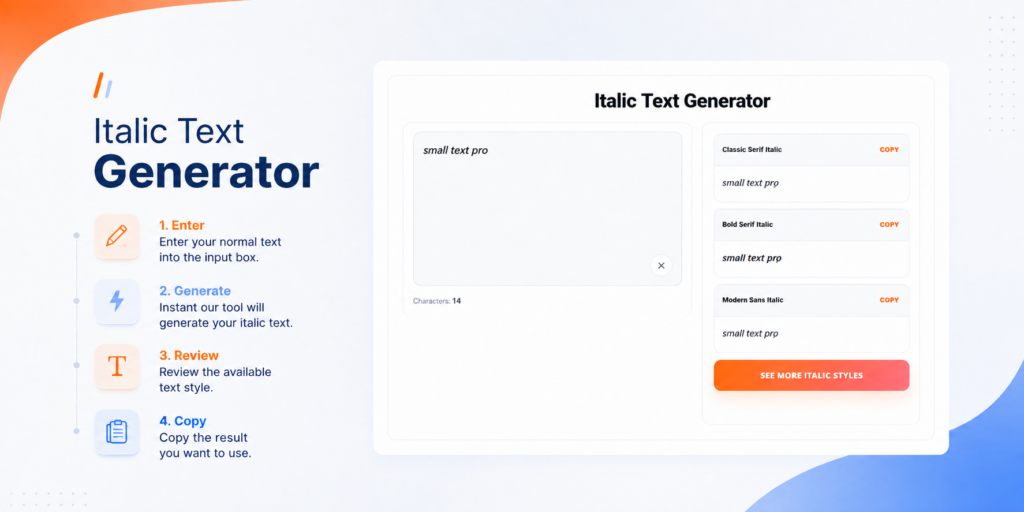
You do not need technical knowledge to use the SmallTextPro Italic Text Generator. The complete process takes only a few steps:
- Enter your normal text into the input box.
- Wait for the tool to generate the italic version.
- Review the available text style.
- Copy the result you want to use.
- Paste it in your profile, caption, message, or any other field that supports it.
You can use one word, your name, a sentence, or a short quote. If you are using the text on social media, it is a good idea to paste a small sample first. This lets you check whether the platform displays every character correctly.
When Is Italic Text Useful?
Putting a word or phrase in italics can help draw attention to it. It can also make a caption or profile feel more like you.
It can be used to draw attention to a small call to action or make a description easier to read. A student could use it as the subject of an artistic project or for quick study notes. Some people may just want a username or bio that is more interesting.You can also try a Bubble Text Generator to create unique rounded-style text for profiles, captions, and creative designs.
Here are a few places where italic text may be useful:
- Instagram, TikTok, or X profiles
- Social media captions
- YouTube video descriptions
- Short quotes and status updates
- Gaming profiles and usernames
- Forum signatures
- Digital invitations
- Creative project headings
- Personal messages
- Informal notes
Italic text is normally most effective when used for a short phrase. If you convert an entire paragraph, it may become difficult to read.
Why Use SmallTextPro?
You could try to find and install a new italic font, but that is often unnecessary when you only need a few styled words. SmallTextPro offers a faster option.
The tool works in your browser through a simple type-and-copy process. You do not need to understand font settings, download a design application, or create an image containing your text.
This makes it useful when you want a quick result. For example, a creator can prepare a styled profile phrase without interrupting their workflow, and a student can make text look different without searching through dozens of fonts.
The result remains text rather than an image, so you can paste it into many text fields and delete or replace it whenever needed.
Is It the Same as Normal Italic Formatting?
Not exactly. The main takeaway is that document editors apply italics, whereas italic text generators use Unicode characters to mimic italics.
When you press the italic button in a document editor, the software changes how normal letters are displayed. The letters themselves do not change; the program only shows them in italics.
An italic text generator usually replaces normal letters with Unicode characters that already have a styled appearance, making it possible to copy the effect into places that do not provide a formatting button.
Both methods can produce a similar visual result, but they should not always be used for the same purpose. The main takeaway is that the right choice depends on where the text will be used.
Regular formatting is the better option for formal documents, articles, school assignments, and professional emails. Unicode italic text is generally better for decorative uses, such as profile names, captions, and short online messages.
Important Things to Check Before Posting
Special characters are widely supported, but they may not work perfectly everywhere. The result can depend on the website, application, font, browser, or device being used.

Create Your Italic Text
You do not need complicated software to make a few words look more interesting. With the SmallTextPro Italic Text Generator, you can enter regular text, create an italic-looking version, and copy it for use on supported platforms.
Use it for a profile, caption, creative heading, or short message. Keep the styling simple, check that the result is readable, and always test it before publishing.
Enter your text in the SmallTextPro Italic Text Generator and create a style that fits your message.
Is the Italic Text Generator Safe?
You should use the same common-sense safety habits that apply to any online text tool.
Do not enter passwords, banking information, private addresses, confidential documents, or other sensitive information. An italic generator only needs the public words or short phrases you want to style.
You should also keep a copy of the original text. If the generated version does not display correctly, you can quickly return to the normal one.
Frequently Asked Questions
Do I have to download a font?
No. The tool creates copyable characters, so you normally do not need to download or install a font.
Why do I see boxes instead of letters?
You can try it in Instagram bios, captions, and comments. Support can vary, so preview the result before publishing it.
Can I use the generated text on Instagram?
This usually happens when a device, app, or font does not support a particular Unicode character. Try another available style or use regular text.
Can students use italic text in assignments?
Students can use it in creative work or informal notes. For a formal assignment, it is better to use the italic formatting provided by Word, Google Docs, or another approved editor.
Can I create italic text on my phone?
Yes. You can open the tool in a mobile browser, enter your words, and copy the generated result. The exact experience may depend on your device and browser.
Is italic text suitable for long paragraphs?
It is possible to convert longer text, but that does not mean it is a good idea. Standard text is easier to read. Italic styles are usually better for names, headings, and short phrases.