Discord Text Generator Create Stylish Discord Text Online
Type your text, pick a style, copy the result, and paste it into Discord. That's the core of it.
What Is a Discord Text Generator?
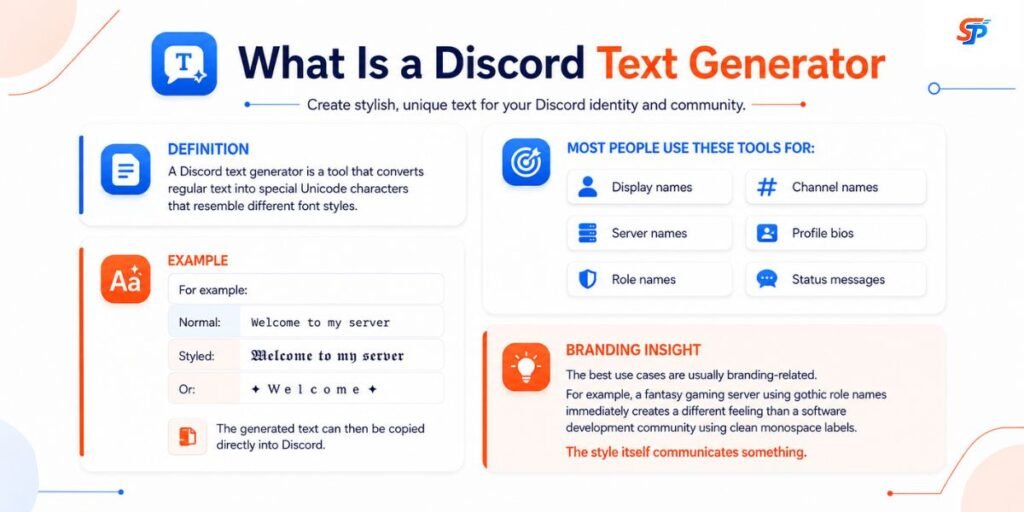
A Discord text generator is a tool that converts ordinary text into decorative Unicode characters that can be copied and pasted into compatible Discord fields.
It isn’t applying a typeface. It’s substituting your letters for different, pre-existing characters from elsewhere in the Unicode standard—bold-style, script-style, gothic-style, and similar sets—that were designed to resemble a stylized version of the alphabet. Type “Discord” and you get back something like 𝓓𝓲𝓼𝓬𝓸𝓻𝓭, built entirely from characters that already exist; nothing is installed on your device or on Discord’s side.
That distinction is why the generated text behaves the way it does: it’s just text, so it goes wherever the receiving field accepts those particular characters—and it doesn’t go where a field restricts characters more tightly, which is exactly the situation with Discord usernames (covered below).
How Does a Discord Font Generator Work?
The tool maps each letter you type to a visually similar character elsewhere in Unicode — one built to look bold, italic, script-like, or otherwise decorative, even though nothing about it is “formatting” in the technical sense.
That’s also why the phrase “font generator” persists even though no font file is being created or installed—it’s the term people search for. Not every character has a stylized counterpart, either. Unicode doesn’t include a decorative match for every letter, number, or symbol, which is why some generators leave punctuation or less common characters unchanged.
How to Use the Discord Text Generator
Our free online tool is easy to use. Just follow these simple steps:
- Type or paste your normal text into the generator.
- Browse the available styles.
- Pick something readable for where you’re about to use it.
- Copy the generated text.
- Open Discord.
- Paste it into the field you want to customize.
- Check how it actually renders before treating it as final.Want a more compact style for your Discord profile? You can create small text using our free Unicode text tool.
If the text is going somewhere semi-permanent—a server name, a role—preview it on both mobile and desktop first. A style that looks sharp on one doesn’t always translate cleanly to the other.
Where Can You Use Fancy Text on Discord?
Not every field treats decorative text the same way. Here’s how it breaks down field by field.
Display Names generally accept a wide range of Unicode, including decorative styles, emoji, and spaces. This is usually the most forgiving place to experiment, since a display name represents one person rather than a whole server’s navigation system.
Server Nicknames: A nickname is specific to one server and can override how your display name shows up there, without changing your global display name. Useful for organizing members by role or team within a single community.
About Me / Bio: Another flexible field. Many people style a single word or short phrase rather than an entire paragraph, keeping the rest in plain text for readability.
Server Names: Styling is generally accepted, subject to Discord’s character limits. Simpler styles tend to hold up more consistently across devices than elaborate ones.
Role Names: One of the more forgiving spots for decoration, since role labels are short. Keep permission-tied roles—”Moderator” and “Admin” — in plain, unambiguous text so members can recognize them instantly.
Channels and Categories: Discord’s own channel-naming rules are stricter and change over time, and heavy sanitization can strip or alter unusual characters. Simple symbols paired with plain text tend to be the safer, more scannable choice here; check Discord’s current documentation before relying on anything unusual.
Messages: Inside a message, you’re choosing between pasting Unicode text directly or using Discord’s Markdown formatting—two different mechanisms, covered in detail below.
Usernames: Important Limitation. This is the field where decorative Unicode generally does not work. Discord’s unique username system is restricted to lowercase Latin letters (a–z), numbers (0–9), underscores, and periods—no spaces, no uppercase, and no decorative or non-Latin Unicode characters. Two periods in a row also aren’t allowed. If you paste a styled Unicode string into the username field, Discord will reject it or fail validation, not silently convert it to something usable.
Discord Username vs. Display Name vs. Server Nickname
These three terms get used interchangeably, but Discord treats them as genuinely different things — and mixing them up is the source of a lot of “why doesn’t this work” confusion.
- Username / @handle — the unique identifier tied to your account. It’s what people use for friend requests and mentions; it’s forced lowercase, and it’s restricted to the limited character set described above.
- Display Name — the name shown across Discord by default when nothing else overrides it. It accepts a much broader range of characters, including uppercase letters, spaces, emoji, and decorative Unicode.
- Server Nickname — a name set for one specific server that overrides your display name only within that server. It follows similar character rules to display names and lets a community organize members without touching their account-wide identity.
Practically: if a decorative style isn’t accepted somewhere, check whether you’re trying to paste it into the username field. That’s the one place it consistently won’t work.
Discord Text Generator vs. Discord Display Name Styles
This is worth separating clearly, because they’re easy to confuse and they aren’t the same technology.
Discord now offers a native feature called Display Name Styles, available to Nitro subscribers. According to Discord’s own support documentation, it lets you customize how your display name appears with a choice of fonts, colors, and effects — set from within Discord’s own settings, not by pasting substituted characters. At the time of writing, Discord’s help documentation lists eight selectable fonts, plus five effect options and customizable colors. Non-Nitro users can preview the styles but can’t save them to their profile. Discord’s documentation also notes that some newer fonts and effects are still experimental and not widely available, and that animations don’t currently display on mobile.
Method | What changes | Typical use | ||
Unicode fancy text | The characters themselves | Display names, bios, nicknames, server/role names where accepted | ||
Discord Markdown | Formatting applied to existing characters | Chat messages | ||
Display Name Styles | Discord’s native font/color/effect rendering of your display name | Display name presentation |
Neither approach is “better” outright — they solve different problems. A Unicode generator is the only option if you want styled text to travel into fields Display Name Styles doesn’t touch, like a bio or a role name. Display Name Styles are the option if you want Discord itself to render your name with color and motion, without relying on copy-pasted characters at all.
Popular Discord Text Styles
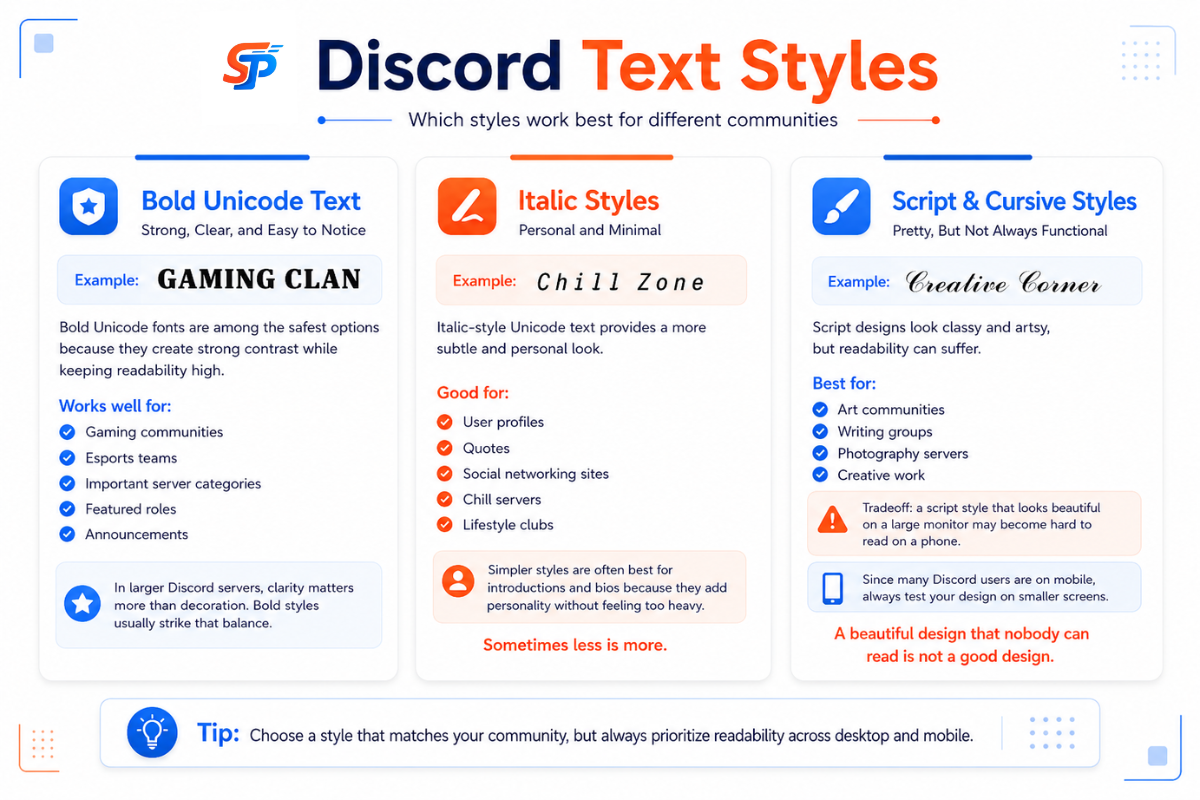
Bold Unicode—great contrast with minimum loss of readability, making it a popular choice for gaming clan names or anything that has to stick out without being difficult to comprehend.
Italic-style Unicode is subtler and often used for short bios or taglines rather than long blocks of text.
Script and cursive styles — visually distinctive and popular in art or writing communities but among the hardest to read at small sizes, especially on mobile. Fine for a short name; rough for anything longer.
Gothic and Fraktur — a natural fit for fantasy, roleplay, or medieval-themed servers, where the style communicates tone before anyone reads the word.
Small caps and bubble text — casual, friendly styles suited to hobby or fan communities; they tend to look out of place in professional or technical spaces.
Monospace-style Unicode — resembles code formatting, which makes it a natural fit for developer or technical communities, particularly for channel or role names tied to code.
None of these is objectively “best”—the right one depends on what the text is for and who’s reading it. That matters more for roles and channels, where recognizability counts, than for a personal bio, where there’s more room to just pick what you like.
Why Do Fancy Discord Fonts Sometimes Look Different?
A Unicode character is a specific, defined code point, but the glyph a reader actually sees depends on whether their device has a font installed that covers that character. Most modern phones and computers cover common Unicode ranges well; decorative or less common character sets aren’t guaranteed to be supported everywhere.
That’s why the same styled text can look identical on two devices and render slightly differently—or fail—on a third. Testing matters more for anything meant to represent your server long-term than for a one-off message.
Why Does My Discord Font Show Boxes?
Boxes, question marks, or blank spaces usually indicate that the reader doesn’t have a font installed that can display that particular Unicode character. Some practical fixes are the following:
- Try a more popular style. Bold and italic Unicode is more widely supported across devices than esoteric decorative sets.
- Don’t stack styles or rare symbols in the same string.
- Before you lock it in, try the text on another device.
- Update your app and OS, as font coverage can change with system updates.
- If you want something that will appeal to a large membership, use plain characters rather than unusual ones.
Do Discord fonts work on both mobile and desktop?
Most common Unicode styles display consistently across Discord’s mobile apps, desktop app, and browser client, since Unicode is a shared standard rather than something Discord itself renders differently by platform. But device-level font coverage still varies, particularly on older hardware. If a styled name matters to how your server presents itself, check it on a phone and a desktop before treating it as final — that quick check catches problems faster than a member reporting boxes in chat.
Are Discord Text Generators Safe?
A basic Unicode text-conversion tool only needs one thing: the text you want converted. It has no legitimate reason to ask for your Discord password, an authentication token, recovery codes, or unrelated personal information.
If a tool that claims to just style text starts asking for account credentials, treat that as a red flag. The character-substitution task itself doesn’t require account access. That said, this isn’t a blanket guarantee about every generator site on the internet—website safety and the Unicode conversion mechanism are two separate questions, and the safety of any specific tool depends on that site, not on Unicode itself.
Accessibility and Readability Tips
Heavily stylized Unicode can work against you in a few specific ways:
- Readability drops as decoration increases—a short name is forgiving; a full sentence in gothic script usually isn’t.
- Exact-match matching can miss it. Some assistive technologies may interpret decorative Unicode differently from ordinary letters, and systems that rely on exact character matching may treat visually similar Unicode as different from standard Latin text.
- Moderation-critical text should stay plain. Rules, announcements, and permission-tied role names are best kept in ordinary text so nobody misreads them and so search or moderation tooling that expects standard characters keeps working as intended.
A workable rule: use decorative Unicode for identity—names, bios, and short labels—and keep instructional or safety-relevant text in plain, unambiguous characters.
Conclusion
Most Discord “fonts” are Unicode character substitutions, not installed typefaces, which is why they work in some fields and not others—usernames being the clearest exception. They’re a good fit for short, identity-driven text: display names, bios, and a role or two. They’re a poor fit for anything that needs to stay instantly readable, like moderation labels, or for the username field, where Discord’s character rules block them outright. If you want Discord to natively style your display name with fonts, colors, and effects instead of pasting substituted characters, that’s a separate Nitro feature—Display Name Styles—worth knowing about even if you end up sticking with a plain Unicode generator for everything else.
Frequently Asked Questions
Which Discord font style is easiest to read?
Bold and italic Unicode are the most widely supported and readable; script, cursive, and gothic styles get harder to read at small sizes.
Where can I use fancy text on Discord?
Display names, bios, server nicknames, server names, and role names generally accept it — the one place it won't work is the username field.
What's the difference between a Discord text generator and Display Name Styles?
A text generator changes the actual characters, while Display Name Styles is Discord's native Nitro feature that adds fonts, colors, and effects without changing the underlying text.
Do Discord fonts look the same on mobile and desktop?
Most common styles stay consistent since Unicode is a shared standard, but font coverage can still vary by device, especially older hardware.
Why does my Discord font show boxes or question marks?
It means the reader's device doesn't have a font installed that supports that particular Unicode character.
What's the difference between a Discord username and a display name?
The username is your unique, lowercase-only @handle for mentions and friend requests, while the display name accepts a much wider range of characters, including decorative styles.