
Invisible Text Generator: Copy and Paste Blank Text
SmallTextPro's Invisible Text Generator creates blank Unicode text for bios, captions, and messages—choose length, copy, then paste, no fonts needed.
Invisible Text
Blank Space Text
Custom Blank Block
What Is Invisible Text?
Invisible text looks empty, but it is not an empty field. It contains a real Unicode character with no visible symbol, or that appears as a blank space.
A person may see nothing on the screen, but a computer may still store, count, copy, or process the character.
This is why an invisible character may work in a field that rejects a normal space. The result still depends on the character and the website or app’s rules.
Invisible text is also called:
- Blank text
- Invisible characters
- Empty characters
- Blank Unicode
- Hidden spaces
- Zero-width text
These names are often used for the same type of tool, although the characters do not all behave in the same way.
Why Does a Normal Space Not Work?
A normal keyboard space is a Unicode character called U+0020. It creates the gap we see between words.
Many apps remove normal spaces when they appear on their own. They may also delete spaces at the start or end of a field. This stops people from sending an empty message or saving a blank name.
Other Unicode characters are handled differently. Some are formatting marks, some are letters, and others are special spaces. They can look blank while still being recognized as text.
That does not mean every invisible character will work everywhere. The main takeaway is that each platform decides which characters it allows.
Types of Invisible Text Characters
Language that can’t be seen comes in many ways. Some types don’t take up any space, while others leave spaces between words or lines. Which one to choose depends on where you want to paste it.
Zero-Width Invisible Text
With zero-width text, it doesn’t take up any space that can be seen. It can go between words or letters without leaving a visible break. It’s often used to format text and add line breaks, but some platforms get rid of it for you.
It can be useful for text formatting, but some websites remove it when pasted.
Blank-Looking Text
This type looks like a blank space, but it is still writing. It might work in places like show names, bios, captions, and notes where a normal space on the computer isn’t allowed. Wide Text That Can’t Be Read
Wide Invisible Text
A larger blank area is created by wide, transparent text. Putting spaces between words in a bio, description, or short message can help. Some apps, devices, and fonts will display different amounts of space. Filler Text Not Visible
Invisible Filler Text
Some systems may recognize filler text as a letter, even if it looks like nothing at all. For systems that support it, this lets you use creative space and profile text that appear empty.
Multiple Invisible Spaces
This option combines many invisible characters into a string that looks empty. Users can choose the length they want for longer gaps, messages that look empty, or profile formatting.
How to Check That the Text Was Copied
Invisible text can be difficult to check because a successful copy and a failed copy may look the same.
Paste the character into a test box with a character counter. If the counter changes from zero to one or more, the box contains text.
You can also move the cursor with your keyboard’s arrow keys. If the cursor moves through a blank area, an invisible character may be present.
On a phone, tap inside the field and use the selection handles. The selected area may confirm that text was pasted.
Where Can You Use Invisible Text?
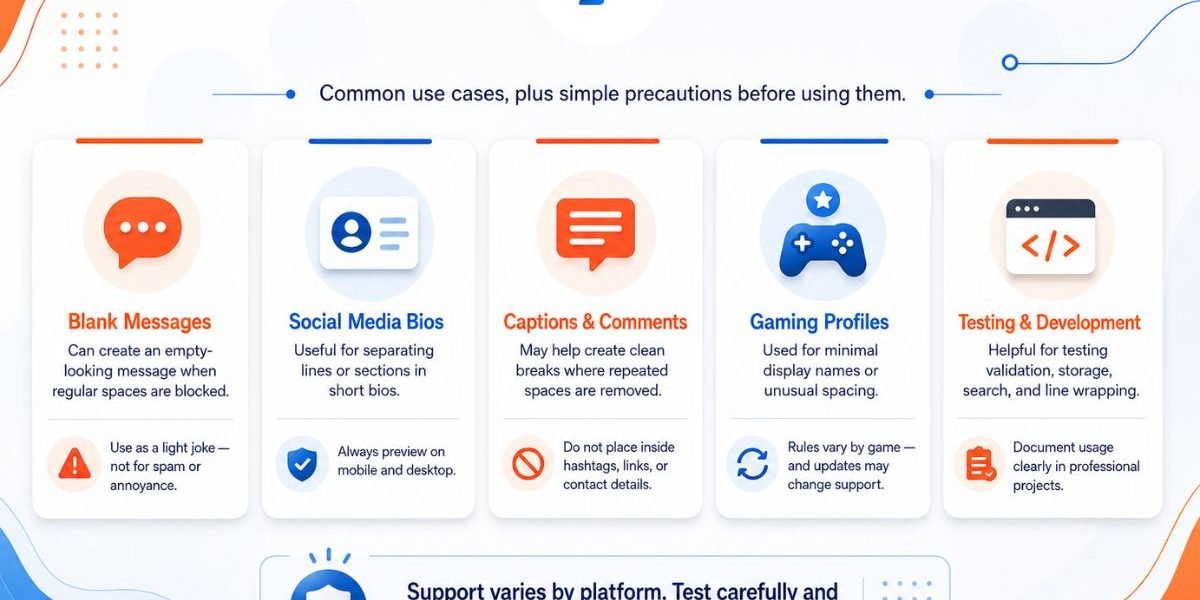
Invisible characters can be useful for formatting and creative purposes. Whether they work depends on the destination.
Is Invisible Text Really Hidden?
Invisible text is hidden from sight, not from software.
A code editor, character counter, spam filter, or text inspection tool can detect its Unicode value. Someone may also find it by copying the content into another program.
Do not use invisible text to store a password, private message, or secret information. It does not provide encryption or security.
Accessibility Matters
Invisible characters can cause issues for people who use screen readers. A screen reader may skip over a character, stop unexpectedly, or mention the technical name of the character. An extended string of blank characters can make a message hard to understand.
The Web Content Accessibility Guidelines support content that people can understand and use with different devices and assistive technologies.
Just follow these simple steps:
- There should not be a lot of blank text near notes.
- Label buttons and other parts of the form that are easy to read.
- Do not put invisible characters between words.
- Leave names, links, and phone numbers in plain text.
- Leave enough space between words when you put important things on your website.
Invisible text is best used as a small visual effect, not as the main way to organize information.
Safe and Responsible Use
An invisible character is a formatting tool. It should not be used to mislead people or avoid safety systems.
Do not use it to:
- Hide a harmful link
- Bypass a spam filter
- Impersonate another user
- Avoid community moderation
- Submit false information
- Fill a required form with fake blank content
You should also avoid entering passwords, financial details, private addresses, or confidential text into any online generator.
Read the destination platform’s rules before using special characters in a username or profile.
Why Use SmallTextPro?
Finding blank Unicode characters manually can take time. SmallTextPro puts copyable options in one convenient place.
Depending on the options shown in the tool, you may be able to:
- Copy blank text with one click.
- Select different character types.
- Generate a custom amount.
- Test the copied result.
- Use the tool on mobile or desktop.
- Create text without installing software.
Always check the finished text in its destination. Compatibility depends on the character, app, device, and current platform rules.
Invisible Text Generator Features
Here are some features of this tool:
Example:
- Generate 1 to 1000 invisible characters
- Character length checker
- Copy with one click
- Mobile compatible
- Multiple Unicode characters
Invisible Text For Different Platforms
Invisible Text for WhatsApp
Keywords:
- invisible message WhatsApp
- blank WhatsApp message
Invisible Text for Discord
Keywords:
- invisible Discord name
- blank Discord username
Invisible Text for Instagram
Keywords:
- invisible Instagram bio
- blank Instagram name
This creates more long-tail rankings.
Types of Invisible Text
Language that can’t be seen comes in many ways. Some types don’t take up any space, while others leave spaces between words or lines. Which one to choose depends on where you want to paste it.
| Type | What It Does | Example Unicode | Best For |
|---|---|---|---|
| Zero-Width Invisible Text | Takes up no space. Sits between letters or words. | U+200B (Zero-Width Space) | Formatting and line breaks |
| Blank-Looking Text | Looks blank but is real, writable text. | U+3164 (Hangul Filler) | Names, bios, captions, notes |
| Wide Invisible Text | Creates a wider blank gap. Size varies by app or font. | U+2800 (Braille Pattern Blank) | Extra spacing in a bio or short line |
| Invisible Filler Text | Reads as a real letter on some systems. | U+200C (Zero-Width Non-Joiner) | Creative spacing in profiles |
| Multiple Invisible Spaces | Strings several blank characters together. | — | Longer gaps or blank-looking messages |
Frequently Asked Questions
What is an invisible text generator?
It is an online tool that produces blank-looking Unicode characters. You can copy the result and paste it into a supported text field.
Is invisible text the same as a space?
No. A keyboard space normally uses U+0020. Invisible text may use another Unicode character with a different purpose and behaviour.
How do I send a blank message?
Copy one invisible character and paste it into the message box. Try sending it once. The result depends on whether the app accepts that character.
Can I make a blank username?
Some platforms accept blank-looking characters in display names, while others block them. Check the naming rules before making a change.
Does it work on iPhone and Android?
Many invisible characters can be copied on both systems. Their appearance and acceptance may differ between apps and operating-system versions.
Why do I see a square?
The device or font may not support the selected character. Try a different option from the generator.
Can invisible characters be detected?
Yes. They may be invisible to a person, but software can identify their Unicode values.