Cursive Text Generator: Create Cursive Fonts Online Free
Generate stylish cursive text online free with our Cursive Text Generator. Create elegant handwriting fonts instantly for social media, designs, and creative projects.
What Is a Cursive Font Generator?
A cursive font generator is a tool that converts standard typed letters into script-style Unicode characters, so the text looks handwritten without requiring any special software to be installed.
The word “font” is doing a lot of work in that name, so it’s worth being precise. A traditional font is a file, installed on a device or embedded in a document, that tells software how to draw each letter. A cursive font generator usually isn’t installing anything. Instead, it looks up existing Unicode characters that already resemble script writing and swaps them in for the plain letters you typed. The result is still ordinary text, made of standard characters, that happens to look decorative.
This distinction explains most of what follows: why the output can be copied and pasted in many places, why it can look different from one device to another, and why long stretches of it get harder to read than plain text.
How Does a Cursive Font Generator Work?
When you type a word, the tool matches each letter to its script-style equivalent and assembles the result. A regular capital “A” becomes 𝒜; a lowercase “b” becomes 𝒷. Because each of these is its own Unicode character, rather than a visual filter applied to the original letter, the output can be selected, copied, and pasted like any other text. It displays in cursive wherever the receiving app or device supports a font that can render it and falls back to a different format otherwise.
One technical detail worth knowing: a small number of script-style letters aren’t part of the Mathematical Alphanumeric Symbols block at all. Rather than duplicating characters already encoded, Unicode places a handful of script letters in a separate block called Letterlike Symbols. Generators handle this by substituting the character from that other block, so a word can occasionally include one letter that looks slightly different in weight or style from the rest. This is a structural feature of how Unicode is organized, not an error in any particular generator. Anyone who wants the precise list of affected letters should check the official Unicode Consortium documentation, since exact mappings are best confirmed at the source.
Try a Quick Example
| Normal text | Cursive-style output |
|---|---|
| Sophia | 𝒮𝑜𝓅𝒽𝒾𝒶 |
| Happy Birthday | ℋ𝒶𝓅𝓅𝓎 ℬ𝒾𝓇𝓉𝒽𝒹𝒶𝓎 |
| Thank You | 𝒯𝒽𝒶𝓃𝓀 𝒴𝑜𝓊 |
Short words and names tend to hold up best when you convert normal text to cursive. Longer phrases still work, but they take more visual effort to read — worth keeping in mind before converting anything longer than a short sentence.
How to Use Our Cursive Font Generator
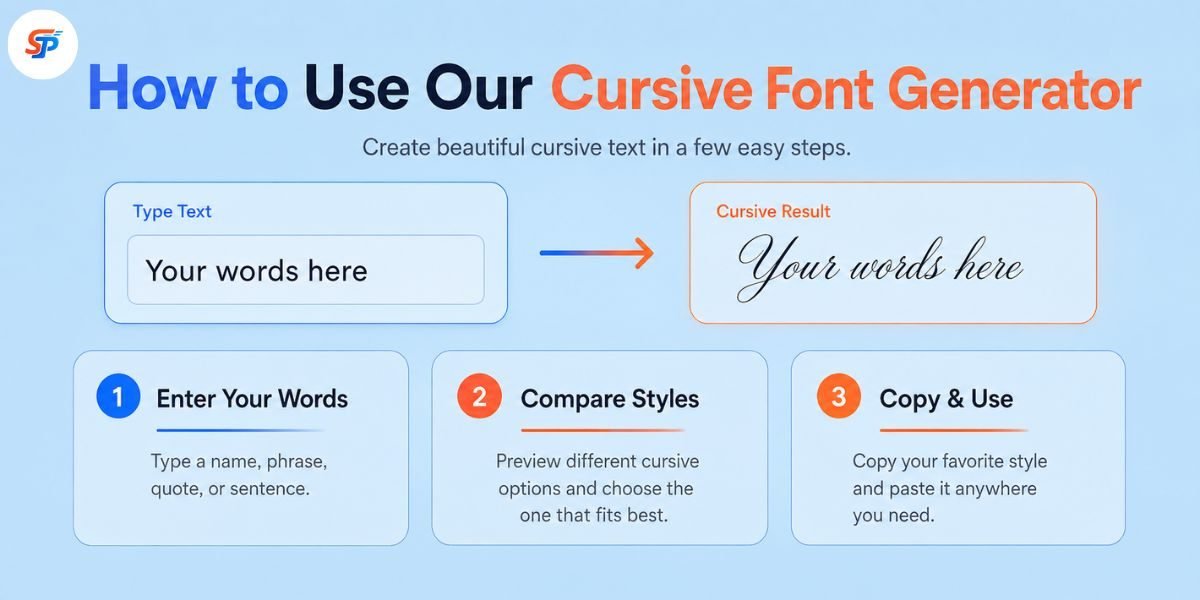
You can achieve this in just a few simple steps using our free tool.
- Type or paste your text into the input box.
- Look through the style options the generator produces.
- Compare a few — some are subtle, some are heavily decorative.
- Pick the version that stays readable at the size you’ll actually use it.
- Copy it using the copy option provided or by selecting the text manually.
- Paste it into the app, bio, or document where you want it to appear.
The interface can vary between tools, but this sequence holds up across most cursive writing generators, since the underlying mechanism — character substitution — works the same way regardless of which tool you use.
Why Do People Use Cursive Text?
Plain text is practical, but it does not always have much personality. Cursive lettering can make a short phrase feel more expressive without requiring a complete graphic design.
Used by a creator to make a profile name stand out. Used by a small business to brainstorm a product name. Used by someone planning a wedding to add a graceful touch to an invitation heading.
Just don’t overuse it. A short cursive phrase can look attractive, but a whole paragraph in decorative text is often difficult and tiring to read.
How to Copy and Paste Cursive Text
On desktop, copying works the same way it does for any text: select the generated string, use your device’s copy shortcut, click into the destination field, and paste. Many generators also include a copy option next to each style that skips the manual selection step.
On mobile, tap and hold the generated text to bring up the selection handles, drag them across the full string, then choose Copy from the menu that appears. Switch to the app you want to use, tap into the text field, and paste.
Either way, it’s worth pasting the text into its actual destination before finalizing anything. A style that looks clean inside the generator can render differently once it’s inside a bio field or a chat window, since different apps and devices handle fonts and character sets differently.
Popular Cursive Text Styles
Cursive text generators typically offer variations pulled from the script and bold-script portions of Unicode, sometimes grouped with adjacent handwriting-style options:
Elegant or flowing script — a connected, classic cursive look. Often used for wedding wording, decorative headings, or anywhere a softer tone fits.
Bold script — heavier strokes that stay legible at a glance. Useful for short headers or names.
Italic cursive — a slanted, simpler alternative to full script, generally easier to read in longer strings.
Handwriting-style text — closer to natural handwriting than formal script, suited to casual captions and personal notes. This is a common request for anyone looking for a handwriting text generator or calligraphy text generator style option.
Signature-style text — designed to visually resemble a handwritten signature. This is a decorative style, not a functional one — more on that below.
Style names vary between tools, and there’s no fixed naming standard. A style labeled “graceful script” on one site might carry a different name elsewhere, even if the underlying characters are similar.
Cursive Name and Signature Generators
A cursive name generator is, in practice, the same tool applied to a name rather than a full sentence. Because names are short, they tend to hold up well in decorative styles.
Example: Creative Studio → 𝒞𝓇𝑒𝒶𝓉𝒾𝓋𝑒 𝒮𝓉𝓊𝒹𝒾𝑜
A cursive signature generator works the same way, producing a script-style rendering of a name that visually resembles handwriting. It can add a personal, decorative touch to an invitation, an email sign-off, or a design mock-up.
It’s important to understand what this kind of styled text is not. A decorative Unicode rendering of a name is mainly a visual effect — it is not, by appearance alone, the same thing as an authenticated electronic-signature process.
Cursive text for social media
Many platforms can display Unicode characters in some text fields, but accepted characters and formatting rules can differ between fields and may change over time. It helps to think about this field by field rather than platform by platform:
Usernames and handles. These are often the most restrictive, since platforms may limit them to a smaller set of standard characters.
Display names and bios. These fields tend to allow a wider range of Unicode characters on many platforms, though this isn’t guaranteed and can vary.
Captions, comments, and messages. These generally behave similarly to bios in terms of character support, but individual apps set their own rules.
Because these rules can differ by field and by platform and can change over time, the most reliable approach for a cursive font generator for Instagram, TikTok, or Discord use is to paste the styled text into the actual field you plan to use and check how it looks and behaves there before relying on it.
Cursive, Script, Calligraphy
The three words are commonly used interchangeably; however, they are used to describe three separate things.Cursive writing is a kind of joined-up handwriting in which the letters are connected in a flowing manner.
A typeface family used in print and on the web that imitates cursive or other flowing handwriting styles.
Calligraphy is a more general practice of writing letters.
Traditionally, it is done with a pen or a brush. Calligraphy is the intentional, artistic creation of letters. It is not a particular character set or typeface, but a skill and a visual history.
None of them are generated directly by a cursive font generator. Rather than original lettering, it generates encoded Unicode text that looks like script and handwriting fonts with existing letters.
Where Cursive Text Works Well—and Where to Avoid It
Cursive-style text fits naturally where personality matters more than function: a display name, a short bio line, a birthday caption, a quote graphic, an invitation heading, or a signature-style flourish on a personal message.
It’s a poor fit anywhere accuracy, searchability, or accessibility matters more than appearance:
- Passwords and login credentials — look-alike Unicode characters can behave unpredictably in fields expecting standard characters.
- Email addresses and URLs – these often depend on standard characters to function correctly as legitimate addresses or working links.
- Legal names and official identity fields — documents typically need to match standard character records exactly.
- Long paragraphs or instructions — sustained decorative text is harder to read and harder for assistive technology to interpret.
- Anything meant to be searched or indexed — search and matching systems typically look for standard characters rather than their stylized Unicode equivalents.
A simple rule covers most of it: the shorter and more decorative the text, the better a fit it is for cursive styling. The more functional the information, the more it belongs in plain text.
Final Takeaway
Type your text, try a few styles, and pick the one that still reads clearly at the size you’ll actually use it. Copy it, paste it into the app or document where it’s going, and check how it looks there before committing. Save cursive text for names, short phrases, captions, and headings — the places where a decorative touch adds something — and leave contact details, instructions, and anything that needs to stay searchable or accessible in ordinary text. A cursive font generator lets me write my name in cursive or dress up a few words using existing characters without needing to install a dedicated script font when a project calls for real typographic control.
Is this the same as installing a cursive font?
No. A traditional font changes the visual design of normal letters. A Unicode cursive generator replaces those letters with separate decorative characters.
Can I use generated cursive text in a logo?
You can use it to explore ideas, but it may not be suitable as a finished business logo. A professional logo should use original or properly licensed lettering and remain clear at different sizes.
Is cursive text accessible?
Not always. Some screen readers have difficulty interpreting decorative Unicode characters. Use cursive text sparingly and keep important information in normal letters.
Is cursive text good for hashtags?
Regular text is usually a better choice for hashtags. Decorative characters are not always treated like standard letters, which may affect how people type, recognize, or find the hashtag.
Can I use cursive text on Instagram?
Yes, many cursive Unicode styles can be pasted into Instagram bios, profile names, captions, and comments. Some characters may look different depending on the device.
Do I need to download anything?
Usually, no. Most cursive text generators work directly in your browser and produce text that is ready to copy.